
To reconcile a POS export to accounting, match the date basis and deduction mapping to your accounting policy first. Then calculate Net Sales as Gross Sales minus Discounts minus Returns, and keep sales tax in a separate liability column. When accounting records refunds in the month processed while a POS report groups them by original order month, cross-month returns create a timing gap, even when every event row is accurate.
In the April 2026 example below, accounting records refunds when processed: $10,000.00 Gross Sales − $600.00 Discounts − $800.00 Returns = $8,600.00 Net Sales, plus $688.00 in monthly sales tax postings. Grouping the same export by original order month drops a $300.00 April refund on a March order and pulls in a $700.00 May refund on an April order, reporting $8,200.00 Net Sales (a −$400.00 gap).
Business numbers fall out of sync across systems often; I’ve seen it plenty. See why your business numbers don’t match across systems for the broader pattern across tools. My preferred tool is Google Sheets because a spreadsheet should be shareable. It should make collaborating with others easy. Every step and formula below also works in Excel for the web.
The results below come from a test of this exact workbook in Google Sheets and Excel for the web, both in US English.
The Example POS Export and Six Common Mismatches
Below is the 8-row POS event export I made up for this article. It sits on one worksheet named POS_Recon, with input headings in A1:I1 and event rows in rows 2 to 9. The Row column below is a row-number guide, not a worksheet column.
Each row records one sale or return event rather than one summary row per order, the grain distinction explained in what one row represents in your sales spreadsheet. That’s why orders ORD-502 and ORD-505 each appear twice: once for the April sale and once for the later return.
| Row | event_id (A) | order_id (B) | order_date (C) | event_date (D) | event_type (E) | gross_sales_usd (F) | discounts_usd (G) | returns_usd (H) | sales_tax_usd (I) |
|---|---|---|---|---|---|---|---|---|---|
| 2 | EVT-7301 | ORD-490 | 2026-03-28 | 2026-04-04 | RETURN | $0.00 | $0.00 | $300.00 | -$24.00 |
| 3 | EVT-7302 | ORD-501 | 2026-04-03 | 2026-04-03 | SALE | $2,000.00 | $200.00 | $0.00 | $144.00 |
| 4 | EVT-7303 | ORD-502 | 2026-04-09 | 2026-04-09 | SALE | $1,500.00 | $0.00 | $0.00 | $120.00 |
| 5 | EVT-7304 | ORD-503 | 2026-04-14 | 2026-04-14 | SALE | $2,500.00 | $250.00 | $0.00 | $180.00 |
| 6 | EVT-7305 | ORD-502 | 2026-04-09 | 2026-04-18 | RETURN | $0.00 | $0.00 | $500.00 | -$40.00 |
| 7 | EVT-7306 | ORD-504 | 2026-04-22 | 2026-04-22 | SALE | $1,800.00 | $150.00 | $0.00 | $132.00 |
| 8 | EVT-7307 | ORD-505 | 2026-04-29 | 2026-04-29 | SALE | $2,200.00 | $0.00 | $0.00 | $176.00 |
| 9 | EVT-7308 | ORD-505 | 2026-04-29 | 2026-05-03 | RETURN | $0.00 | $0.00 | $700.00 | -$56.00 |
Notice EVT-7301 in row 2 and EVT-7308 in row 9. Both cross a month boundary between the original order date and the return processing date, and EVT-7308 belongs to May on an event-date basis.
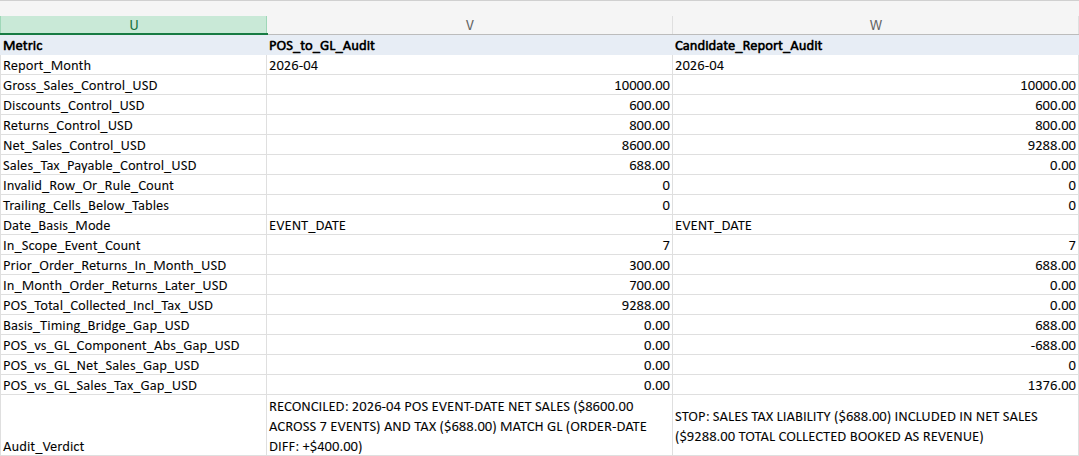
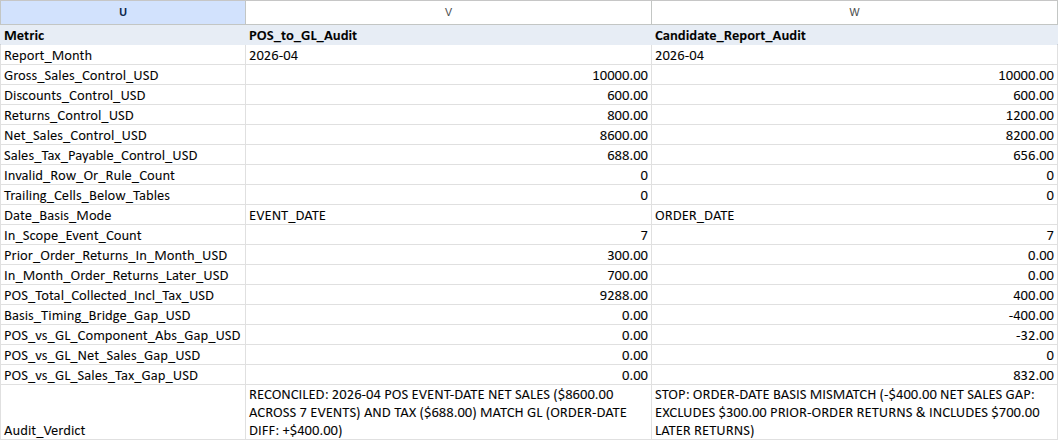
Here’s how the clean event-date baseline and the six common mismatches look when compared against closed accounting controls of $10,000.00 Gross Sales, $600.00 Discounts, $800.00 Returns, $8,600.00 Net Sales, and $688.00 in monthly Sales Tax Payable activity:
| Report Version Tested in Column W | Gross / Disc / Ret | Reported Net Sales | Tax Reported | Net Gap vs. GL | Check Block Says (W19) |
|---|---|---|---|---|---|
| Clean event-date match | $10,000 / $600 / $800 | $8,600.00 | $688.00 | $0.00 (7 events) | RECONCILED: CANDIDATE SUMMARY TOTALS MATCH 2026-04 EVENT-DATE POS AND GL ($8600.00 NET SALES; $688.00 TAX; VERIFY EVENT ROWS) |
| Order-date cohort report | $10,000 / $600 / $1,200 | $8,200.00 | $656.00 | -$400.00 (7 events) | STOP: ORDER-DATE BASIS MISMATCH (-$400.00 NET SALES GAP: EXCLUDES $300.00 PRIOR-ORDER RETURNS & INCLUDES $700.00 LATER RETURNS) |
| Double-negative subtraction flip | $10,000 / $600 / $800 | $11,400.00 | $688.00 | +$2,800.00 | STOP: CANDIDATE NET SALES FORMULA GAP (+$2800.00 VS GROSS - DISCOUNTS - RETURNS; CHECK SIGN FLIP OR TAX INCLUSION) |
| Sales tax booked as revenue | $10,000 / $600 / $800 | $9,288.00 | $0.00 | +$688.00 | STOP: SALES TAX LIABILITY ($688.00) INCLUDED IN NET SALES ($9288.00 TOTAL COLLECTED BOOKED AS REVENUE) |
| Unfiltered multi-month export | $10,000 / $600 / $1,500 | $7,900.00 | $632.00 | -$700.00 (8 events) | STOP: UNFILTERED MULTI-MONTH EXPORT (8 VS 7 EVENTS; -$700.00 NET SALES GAP FROM OUT-OF-MONTH ROWS) |
| Gross sales without deductions | $10,000 / $0 / $0 | $10,000.00 | $688.00 | +$1,400.00 (5 events) | STOP: CANDIDATE EVENT COUNT MISMATCH (5 VS 7 EVENTS; +$1400.00 NET SALES GAP) |
| Netted discounts vs. contra lines | $9,400 / $0 / $800 | $8,600.00 | $688.00 | $0.00 net ($1,200.00 line diff) | STOP: NET SALES MATCH ($8600.00) BUT GROSS/DISCOUNT/RETURN LINES DIFFER BY $1200.00 (CHECK NETTED DISCOUNTS OR CONTRA ACCOUNTS) |
Only the first row agrees on timing, deductions, and tax separation at once. Every other row fails for a different reason.
Before You Paste: Normalize Your Export and Confirm Accounting Rules
Before you copy formulas or paste rows into POS_Recon, confirm how your accounting system handles timing, discounts, and sales tax, and map your export into the workbook’s normalized columns. The table in A1:I9 is a normalized event schema made up for this guide, not a drop-in export from Shopify, WooCommerce, or Square. Columns A to I hold the nine typed inputs, while columns J to N hold live helper formulas, never pasted values. Likewise, build Q2:S8, V8:V19, and W12:W19 with the live formulas from the Reference below rather than typing summary numbers over them.
Re-key source IDs and check checkout timing before pasting. The row validation formula J2 enforces a tight demonstration ID format: uppercase EVT- followed by two, three, or four digits (0 to 9, including leading zeros) in column A, and uppercase ORD- followed by two, three, or four digits in column B, with no spaces, line breaks, wildcard characters (*, ?, ~), or comparison characters (=, <, >). If your POS exports keys in another shape (such as #1001, UUIDs, or plain numbers), map your source event and order IDs through a unique side crosswalk into the EVT- and ORD- pattern before pasting into A2:B9, using the technique in map inconsistent customer names to stable IDs. Keep the same ORD- key across an original sale and every later return on that order. Notice also that J2 assumes immediate checkout (event_date equals order_date on SALE rows); if your workflow captures payment or revenue on a date after order_date, adapt and retest J2 before pasting SALE rows.
Map discounts and returns cleanly from your POS platform. In POS_Recon, every SALE row requires amounts of zero or more in columns F and G (with G no greater than F), 0 in H, and zero or positive tax in I. Every RETURN row requires 0 in F (gross_sales_usd) and 0 in G (discounts_usd), the post-discount, pre-tax revenue reduction as a positive amount in H (returns_usd), and zero or negative reversed tax in I (sales_tax_usd).
As an arithmetic example of why post-discount amounts belong in column H, suppose an item sells for $100.00 with a $10.00 discount ($90.00 net) and comes back for a full $90.00 refund. Entering 100 in column H leaves net sales at -$10.00 instead of $0.00; the model requires 90 in H. Even when an order had zero discount, any overstated magnitude in H breaks reconciliation: in the test, replacing $500.00 with an overstated $700.00 in H6 (EVT-7305, returning part of ORD-502, which sold with $0.00 discount) pushed POS Net Sales to $8,400.00 and stopped V19 with a -$200.00 gap against accounting. Never run ABS() blindly across mixed-sign platform columns, and verify currency, business timezone cutoffs, and gross or return scope before pasting:
- Shopify sales schema: Shopify documents one event per row (
dayandmonthrecord when the sale or return happened), and notessales_reversalsreplacingreturnsstarting in version 2026-10. Match column H (returns_usd) specifically tonet_sales_reversals(“Value of items removed from orders after discounts, before taxes,” equal togross_sales_reversals + discount_reversals) after verifying sign conventions and flipping negative reversals to positive magnitudes. Don’t substitute pre-discountgross_sales_reversalsor broadtotal_sales_reversals(which includes shipping, taxes, and fees). - WooCommerce Revenue Report: WooCommerce reports separate
Gross sales,Returns,Coupons,Net sales, andTaxescolumns, and notes that for fully refunded orders, refunded tax can appear insideReturns. Strip that refunded tax out of H and move it into I when loadingPOS_Recon. - Square in-app summaries and reports: Square defines
Net salesas “Gross sales minus returns minus discounts and comps,” defines itemizedReturnsas excluding partial refunds, custom-amount refunds, taxes, and discounts, reports partial and specific-dollar refunds separately underRefunds by amount, and notes under payment methods thatRefund amountaccounts for taxes and discounts. Loading only itemizedReturnsinto H omits partial and custom-amount refunds that accounting still records. Classify each refund into this workbook’s post-discount, pre-tax revenue reduction in H and signed tax reversal in I, exclude or separately reconcile out-of-scope items such as tips or shipping, and never blindly sum aggregate refund fields or double-count a payment refund already counted as an itemized return.
Confirm your refund timing and discount policy. Platform defaults vary, so check how your accounting reports present refunds and discounts. Stripe’s Revenue Recognition settings state that, by default, refunds offset revenue in the accounting period when they occur, and discounts are recorded directly in Revenue accounts. You can opt in to separate contra-revenue reporting by turning on Record refunds separately (which books refunds to a separate contra-revenue account) and Record discounts as contra revenue. Both are configurable software defaults, not universal accounting laws.
This workbook models books that record refunds in the month processed and track both Discounts (V4) and Returns (V5) in separate contra-revenue lines rather than netting them into Gross Sales. Under a default netted setup, the income statement has no standalone Returns or Discounts lines for V4 and V5. Readers don’t have to change their accounting settings to use this workflow: pull separate contra-revenue accounts into V4:V5 when your chart of accounts tracks them, or map both the POS summary and the independently sourced GL controls to matching gross, discount, and return definitions. An ORDER_DATE stop in W19 flags a mismatch against this sheet’s event-date control rather than an invalid report if your own policy matches cohorts elsewhere. Likewise, netted discounts in row 7 of the matrix ($9,400.00 Gross, $0.00 Discounts, $8,600.00 Net Sales) reflect a line-mapping choice rather than lost sales: |9,400 − 10,000| + |0 − 600| = $1,200.00 in component differences while Net Sales stays $8,600.00. See how many extra sales a discount must generate when planning promo margins. Multi-period deposits and deferred revenue are outside this sheet and belong with your CPA.
Enter monthly sales tax postings in V7, not your ending balance-sheet payable. Cell Q8 sums the signed tax collected and reversed during April ($688.00). IRS Publication 334 explains under Sales tax collected that state and local sales taxes imposed on the buyer and collected for government are not business income (Pub 334 treats taxes imposed on the seller separately, and this workbook assumes buyer-imposed tax). In V7 (Sales_Tax_Payable_Control_USD), type only the month’s credit-positive GL sales and refund tax postings, excluding opening balances, remittances, and unrelated adjustments. Suppose Sales Tax Payable opened April at $500.00, added $688.00 in April tax activity, and paid $600.00 to the state, leaving a $588.00 closing balance. Enter 688 in V7, not 588. In the test, entering 588 in V7 stopped V19 and W19 with STOP: SALES TAX LIABILITY DIFFERS FROM GL BY +$100.00 even though the books were completely consistent. Frame V14 ($9,288.00) strictly as Net Sales plus sales tax in this immediate-checkout example; it excludes shipping, tips, gift cards, fees, duties, and payout timing, so it isn’t a bank deposit figure.
Step 1: Validate Event Rows and Extract Month Labels
Lay out POS_Recon in three blocks side by side, leaving columns O and T empty as spacers:
A1:N9holds the nine POS export columns inA:Iand five helper formula columns inJ:N.P1:S8holds the Event-Date vs. Order-Date timing bridge (ending intentionally at row 8).U1:W19holds the closed GL controls (V2:V7), the POS-to-GL audit (V8:V19), candidate test inputs (W2:W11), and the candidate audit (W12:W19).
Enter dates in C2:D9 as real spreadsheet dates formatted YYYY-MM-DD, and type money amounts in F2:I9 as plain numbers (1800, not “$1,800”). Paste the headings and initial placeholders (W2:W7 and W10:W11 set to "NOT TESTED", W8:W9 set to 0) along with all 41 live formulas from the Formula Reference at the end.
In the workbook’s Python formula reference model (not a separate live partial-entry test), intermediate states behave this way while typing controls: before '2026-04 is typed as text in V2, Q2:S8 shows "CHECK INPUTS"; once V2 holds 2026-04 while V3:V7 remain blank, Q2:S8 calculates while V19 reads STOP: INVALID GL CONTROL INPUTS IN V2:V7; and leaving W2:W11 blank triggers STOP: INVALID CANDIDATE GUARD INPUTS.
With April data and closed GL controls loaded, helper columns J2:N9 read like this:
| Row | event_id (A) | event_type (E) | Row_Check (J) | Event_ID_Freq (K) | Order_Month (L) | Event_Month (M) | Row_Net_Sales_USD (N) |
|---|---|---|---|---|---|---|---|
| 2 | EVT-7301 | RETURN | OK | 1 | 2026-03 | 2026-04 | -$300.00 |
| 3 | EVT-7302 | SALE | OK | 1 | 2026-04 | 2026-04 | $1,800.00 |
| 4 | EVT-7303 | SALE | OK | 1 | 2026-04 | 2026-04 | $1,500.00 |
| 5 | EVT-7304 | SALE | OK | 1 | 2026-04 | 2026-04 | $2,250.00 |
| 6 | EVT-7305 | RETURN | OK | 1 | 2026-04 | 2026-04 | -$500.00 |
| 7 | EVT-7306 | SALE | OK | 1 | 2026-04 | 2026-04 | $1,650.00 |
| 8 | EVT-7307 | SALE | OK | 1 | 2026-04 | 2026-04 | $2,200.00 |
| 9 | EVT-7308 | RETURN | OK | 1 | 2026-04 | 2026-05 | -$700.00 |

J2 validates each row against this workbook’s rules before downstream sums run. Unless every rule passes, J2 returns "CHECK ROW", L2:M2 stay blank, N2 returns "CHECK ROW", and V19 stops:
- Every row has all nine input cells populated, with text in A, B, and E, whole dates (
2000-01-01to2100-01-01) withD2greater than or equal toC2, and numbers with no more than two decimal places inF:I. event_idmatchesEVT-plus two to four digits andorder_idmatchesORD-plus two to four digits, uppercase with no spaces, line breaks, wildcard characters (*,?,~), or comparison characters (=,<,>).- On a
SALErow,D2equalsC2,F2is 0 or more,G2is from 0 up toF2,H2is 0, andI2is 0 or more. On aRETURNrow,F2andG2are 0,H2is above 0, andI2is 0 or negative.
Text dates are easy to miss in CSV imports. In the test, an Excel .xlsx cell stored as @ text "2026-04-04" in D2 returned "CHECK ROW" in both Google Sheets and Excel for the web. On a scratch copy in Google Sheets, typing '2026-04-04 also started at "CHECK ROW", though choosing Format > Number > Date re-parsed that typed string into real serial date 4/4/2026 ("OK"). In Excel text cells and unparseable locale strings, changing display format does not convert text into dates, so check Row_Check (ISNUMBER on C2 and D2).
Once all rows in J2:J9 pass, K2 counts matching event_id rows using SUMPRODUCT (documented in Google’s SUMPRODUCT help and Microsoft’s SUMPRODUCT help):
=IF(OR(NOT(EXACT(J2, "OK")), COUNTIF($J$2:$J$9, "OK")<ROWS($A$2:$A$9)), "", SUMPRODUCT(--(UPPER($A$2:$A$9)=UPPER(A2))))
Any duplicate ID sets K2 above 1 and stops V19 (notice UPPER checks case-insensitively, though J2 already enforces uppercase IDs). Next, L2 formats Order_Month with TEXT(C2, "yyyy-mm") and M2 formats Event_Month with TEXT(D2, "yyyy-mm") (see Google TEXT and Microsoft TEXT), while N2 evaluates signed row net sales with ROUND(F2-G2-H2, 2). That assigns -$300.00 to EVT-7301 (2026-03 order, 2026-04 event) and -$700.00 to EVT-7308 (2026-04 order, 2026-05 event). Fill J2:N2 down through row 9.
Step 2: Bridge Event-Date and Order-Date Totals
In POS_Recon!P1:S8, build a side-by-side bridge comparing the export by Event_Month in column Q (event_date_basis) and Order_Month in column R (order_date_basis), with the signed difference (Q - R) in column S:
| Row | bridge_line (P) | event_date_basis (Q) | order_date_basis (R) | event_minus_order_diff (S) |
|---|---|---|---|---|
| 2 | Sale_Event_Count | 5 | 5 | 0 |
| 3 | Return_Event_Count | 2 | 2 | 0 |
| 4 | Gross_Sales_USD | $10,000.00 | $10,000.00 | $0.00 |
| 5 | Discounts_USD | $600.00 | $600.00 | $0.00 |
| 6 | Returns_USD | $800.00 | $1,200.00 | -$400.00 |
| 7 | Net_Sales_USD | $8,600.00 | $8,200.00 | $400.00 |
| 8 | Sales_Tax_Liability_USD | $688.00 | $656.00 | $32.00 |
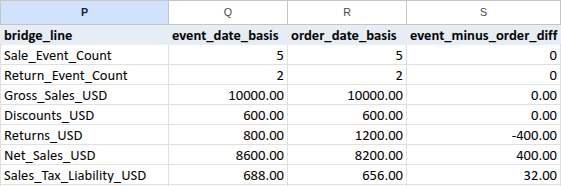
Ending the bridge at row 8 keeps row 9 exclusive to the export table. Both columns use COUNTIFS and SUMIFS (Google SUMIFS, Microsoft SUMIFS, Google COUNTIFS, and Microsoft COUNTIFS; see SUMIFS vs. pivot tables for monthly reporting when structuring recurring workbooks). Always verify the target month actually loaded into your report before closing.
Column Q filters on Event_Month ($M$2:$M$9):
Q4sumsgross_sales_usd($10,000.00),Q5sumsdiscounts_usd($600.00), andQ6sumsreturns_usd($800.00).Q7calculates Net Sales withROUND(Q4-Q5-Q6, 2)($8,600.00).Q8sumssales_tax_usd($688.00).
Column R swaps $M$2:$M$9 for Order_Month ($L$2:$L$9), yielding $1,200.00 in R6 Returns, $8,200.00 in R7 Net Sales, and $656.00 in R8 Sales Tax.
Look at why April shows a +$400.00 timing bridge ($8,600.00 - $8,200.00):
EVT-7301($300.00 prior-order return processed in April): Refunded2026-04-04for March orderORD-490, soQ6includes $300.00 whileR6drops it into March. You don’t need March’s closedORD-490sale row in this workbook to reconcile April on an event-date basis.EVT-7308($700.00 April-order return processed in May): Refunded2026-05-03for April orderORD-505, soR6pulls $700.00 back into April whileQ6keeps it in May.- Exact timing math: $8,200.00 − $300.00 + $700.00 = $8,600.00.
Notice also that R2:R8 reflects only events included as of this example’s assumed export date (2026-05-03). Refreshing an order-cohort POS report weeks later keeps rewriting April whenever later refunds arrive, whereas under the modeled policy or a frozen month-end snapshot, closed April figures stay put unless you deliberately reopen the period or post an adjustment. Read how to save a month-end spreadsheet snapshot without breaking formulas to freeze closed months safely.
Step 3: Tie Out Accounting Controls and Audit Candidate Reports
In POS_Recon!U1:W19, column V reconciles the bridge against closed GL controls (V2:V7), and column W checks any candidate report summary (W2:W11) against both accounting and POS.
| Row | Metric (U) | POS_to_GL_Audit (V) | Candidate_Report_Audit (W at Baseline) |
|---|---|---|---|
| 2 | Report_Month | 2026-04 (typed text) | NOT TESTED (candidate month) |
| 3 | Gross_Sales_Control_USD | $10,000.00 (typed) | NOT TESTED (candidate gross) |
| 4 | Discounts_Control_USD | $600.00 (typed) | NOT TESTED (candidate discounts) |
| 5 | Returns_Control_USD | $800.00 (typed) | NOT TESTED (candidate returns) |
| 6 | Net_Sales_Control_USD | $8,600.00 (typed) | NOT TESTED (candidate net sales) |
| 7 | Sales_Tax_Payable_Control_USD | $688.00 (typed) | NOT TESTED (candidate tax) |
| 8 | Invalid_Row_Or_Rule_Count | 0 (formula) | 0 (typed guard cell) |
| 9 | Trailing_Cells_Below_Tables | 0 (formula) | 0 (typed guard cell) |
| 10 | Date_Basis_Mode | EVENT_DATE (formula) | NOT TESTED (EVENT_DATE / ORDER_DATE / ALL_ROWS) |
| 11 | In_Scope_Event_Count | 7 | NOT TESTED (candidate event count) |
| 12 | Prior_Order_Returns_In_Month_USD | $300.00 | Formula: net sales minus (gross – discounts – returns) |
| 13 | In_Month_Order_Returns_Later_USD | $700.00 | Formula: candidate gross minus event-date gross |
| 14 | POS_Total_Collected_Incl_Tax_USD | $9,288.00 | Formula: abs diff in discounts and returns vs. POS |
| 15 | Basis_Timing_Bridge_Gap_USD | $0.00 | Formula: candidate net sales minus GL control |
| 16 | POS_vs_GL_Component_Abs_Gap_USD | $0.00 | Formula: candidate tax minus GL control |
| 17 | POS_vs_GL_Net_Sales_Gap_USD | $0.00 | Formula: candidate events minus POS event count |
| 18 | POS_vs_GL_Sales_Tax_Gap_USD | $0.00 | Formula: total abs gap across all checked metrics |
| 19 | Audit_Verdict | RECONCILED: 2026-04... |
NOT TESTED: ENTER CANDIDATE REPORT TOTALS |
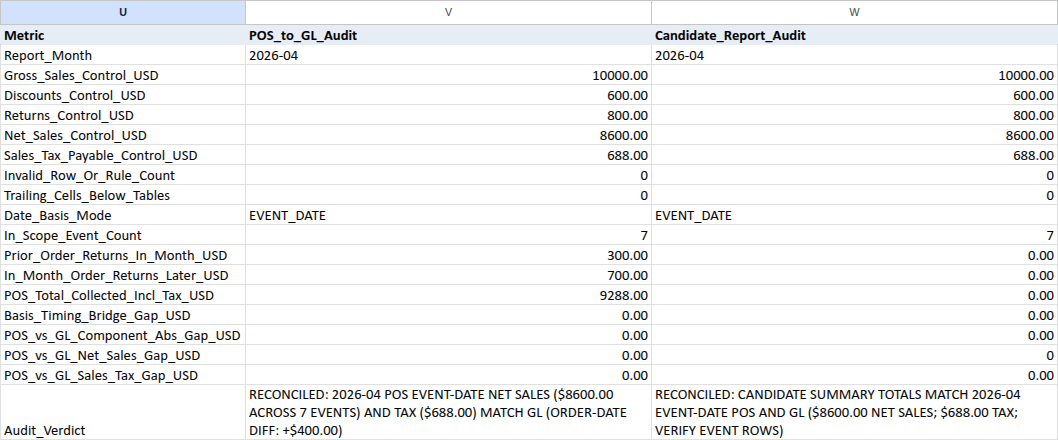
Rows 12 to 18 evaluate different checks in column V than in column W. In column V, V12 and V13 isolate the two cross-month return legs, V14 calculates Q7 + Q8, V15 verifies Q7 = R7 - V12 + V13 and row sums from column N ($0.00 gap), and V16:V18 test line components, Net Sales, and Sales Tax against V3:V7. In column W, W12:W18 stay "NOT TESTED" until you replace W2:W7 and W10:W11 with candidate readings, checking internal P&L arithmetic (W12), component gaps (W13:W14), GL Net Sales gap (W15), tax gap (W16), and event count diff (W17).
Avoid "<>"&$V$2 inside SUMIFS against yyyy-mm text in Google Sheets. On a probe tab in the test (Probe_V12_NotEqual), the "<>"&$V$2 criteria in V12 and V13 returned $300.00 and $700.00 in Excel for the web, but returned $800.00 (V12) and $1,200.00 (V13) with V15 at $0.00 in Google Sheets ($500.00 from the same-month return EVT-7305 counted into both legs while +$500.00 and -$500.00 canceled silently inside V15). Google Sheets appears to treat "<>2026-04" in SUMIFS differently from plain text inequality when matching yyyy-mm text in $L$2:$M$9, whereas exact equality against $V$2 matches reliably. Subtracting same-month equality returns from Q6 and R6 yields exact $300.00 and $700.00 legs in both Google Sheets and Excel for the web:
V12:=IF(NOT(ISNUMBER(V11)), "CHECK INPUTS", ROUND(Q6-SUMIFS($H$2:$H$9, $M$2:$M$9, $V$2, $L$2:$L$9, $V$2, $E$2:$E$9, "RETURN"), 2))V13:=IF(NOT(ISNUMBER(V11)), "CHECK INPUTS", ROUND(R6-SUMIFS($H$2:$H$9, $L$2:$L$9, $V$2, $M$2:$M$9, $V$2, $E$2:$E$9, "RETURN"), 2))
Wait until V19 says RECONCILED before checking another report in column W. Enter candidate totals as static numbers, leave W8 and W9 at 0 (confirming you checked the candidate export for invalid rows and trailing rows outside its table), and reset W2:W7 and W10:W11 to "NOT TESTED" with W8:W9 at 0 between runs. Keep gap signs consistent when investigating W15, following the signed variance convention in budget vs. actual: explain the variance correctly.
Beyond the baseline plus six matrix mismatches above, these single-tab checks were also verified live across all 40 test tabs (T01–T40). To repeat one without touching the base sheet, duplicate POS_Recon first, apply the exact change below on the copy, and delete the copy afterward:
| Condition Tested | Change on a Duplicate of POS_Recon |
Observed Output (V19 or W19) |
|---|---|---|
Closing tax balance entered in V7 |
Type 588 instead of 688 in V7 |
V19: STOP: SALES TAX LIABILITY DIFFERS FROM GL BY +$100.00 |
Overstated return amount in H6 |
Type 700 instead of 500 in H6 (EVT-7305) |
V19: STOP: POS EVENT-DATE NET SALES DIFFERS FROM GL BY -$200.00 |
| Negative return export magnitude | Type -300 in H2 |
J2: "CHECK ROW"; V19: STOP: INVALID OR BLANK POS EXPORT ROWS |
Unresized May row added (A10:I10) |
Enter EVT-7309, ORD-506, dates 2026-05-04, 2026-05-04, SALE, 900, 0, 0, 72 (leave J10:N10 blank) |
V9 = 9; V19: STOP: TRAILING ROWS BELOW EXPORT OR BRIDGE TABLE (RESIZE RANGES) |
Formula returning "" left below table |
Enter ="" in A100 |
V9 = 1; V19: STOP: TRAILING ROWS BELOW EXPORT OR BRIDGE TABLE (RESIZE RANGES) |
| Formula inside GL controls | Enter ="2026-04" in V2 |
V19: STOP: FORMULA IN GL CONTROLS (ENTER STATIC VALUES IN V2:V7) |
Zero-event closed month (2026-06) |
Keep A2:I9 as is; type '2026-06 in V2 and 0 in each of V3:V7 (optional candidate check: '2026-06, five 0s, 0, 0, EVENT_DATE, 0 in W2:W11) |
V11 = 0; V19: RECONCILED: 2026-06 POS EVENT-DATE NET SALES ($0.00 ACROSS 0 EVENTS) AND TAX ($0.00) MATCH GL (ORDER-DATE DIFF: +$0.00) |
Notice that last row: a closed month with zero in-scope events (2026-06) does not require deleting A2:I9 and reconciles cleanly when all GL controls hold explicit 0s, whereas blank controls always stop.
Resizing POS_Recon When Next Month Has More or Fewer Events
Never insert or delete whole sheet rows on POS_Recon. Whole-row edits shift or cut the bridge (P1:S8) and audit (U1:W19) tables sitting beside the event export.
Instead, every export endpoint inside J2:W19 uses a column-qualified reference (:$A$9, :$E$9, :$F$9, :$G$9, :$H$9, :$I$9, :$J$9, :$K$9, :$L$9, :$M$9, and :$N$9) so resizing never collides with $S$8, $V$19, or $W$19. To resize from 8 events (last row 9) to N events (last row R = N + 1, such as row 10):
- When growing beyond the 8-row baseline, paste the added event inputs in
A10:I<R>below row 9, leaving columns J to N blank in those added rows for a moment (when shrinking to fewer events, follow the clear-tail order below instead). - Select
J2:W19(or extend down through the larger of row 19 and the prior export’s last rowR_prev) and run Find and Replace across the 11 column-qualified endpoints (:$A$9to:$N$9, replaced with:$A$<R>to:$N$<R>) using the engine path below. - Fill
J2:N2down throughJ<R>:N<R>, updateV2:V7to the closed GL totals for the month, and check thatV8 = 0,V9 = 0, andV19starts withRECONCILED.
Both programs handle that formula replacement differently:
- Google Sheets: choose Edit > Find and replace, set Search to Specific range, leave Match entire cell contents unchecked, and check Also search within formulas (unchecked by default; in the scratch test on
'Copy of POS_Recon'!J2:W19, leaving it unchecked found zero matches, while checking it replaced all 19 instances of:$A$9with:$A$10). - Excel for the web: choose Home > Find & Select > Replace, leave Within on Sheet under Search options (safe because every source endpoint is column-qualified by
:$A$..:$N$and misses$S$8,$V$19, and$W$19), and leave Match entire cell contents unchecked; the tested dialog has no formula toggle and edits formula text directly.
On later monthly resizes, replace the current last-row endpoint rather than $9; for example, after resizing to 18 events, replace :$A$19 with the new endpoint and repeat across :$E$19 through :$N$19. When shrinking an export (N < N_prev), run Find and Replace first to point formulas at the shorter range, then clear old cells below row <R> in A:N. This exact column-qualified pattern passed live testing at N = 7 (last row 8, matching $S$8), N = 18 (last row 19, matching $V$19:$W$19), and N = 105 rows, as well as reversed row shuffles.
If you download an .xlsx template and open it in Google Sheets, verify File > Settings locale (United States) and timezone (matching your store cutoff timezone) before relying on date cutoffs; importing the .xlsx test workbook into Google Sheets defaulted timezone to GMT+03:00 until switched manually.
Boundary Tests That Resize or Replace the Export
These two tested boundary setups replace the 8-row baseline export on a disposable duplicate tab after resizing ranges cleanly:
- Same-month cohort (
ORDER_DATEwith $0.00 current gap, resized to 6 events): DuplicatePOS_Recon, place the 6 April-to-April events (EVT-7302throughEVT-7307) inA2:I7, run Find and Replace (:$A$9..:$N$9to:$A$7..:$N$7), clearA8:N9, setV2:V7to'2026-04, 10000, 600, 500, 8900, 712, and setW2:W11to'2026-04, 10000, 600, 500, 8900, 712, 0, 0,ORDER_DATE, 6.V19reconciles at $8,900.00 (ORDER-DATE DIFF: +$0.00), whileW19still warns:STOP: ORDER-DATE BASIS SELECTED (TOTALS MATCH NOW AT $8900.00, BUT FUTURE RETURNS WILL REWRITE CLOSED MONTH; USE EVENT_DATE). - Heavy-return net-negative month (resized to 2 events): Duplicate
POS_Recon, run Find and Replace (:$A$9..:$N$9to:$A$3..:$N$3), and clearA4:N9. Type row 2 (EVT-7310,ORD-601,2026-04-02,2026-04-02,SALE, 200, 0, 0, 16) and row 3 (EVT-7311,ORD-505,2026-03-29,2026-04-05,RETURN, 0, 0, 500, -40). SetV2:V7to'2026-04, 200, 0, 500, -300, -24, and setW2:W11to'2026-04, 200, 0, 500, -300, -24, 0, 0,EVENT_DATE, 2.V14evaluates to -$324.00, andV19reconciles cleanly:RECONCILED: 2026-04 POS EVENT-DATE NET SALES (-$300.00 ACROSS 2 EVENTS) AND TAX (-$24.00) MATCH GL (ORDER-DATE DIFF: -$500.00)(withW19also reconciled).
What These Checks Can’t Prove
"RECONCILED" and "VERIFY EVENT ROWS" show that the worksheet math matches the static GL numbers entered in V2:V7. They cannot prove completeness or authorization outside the sheet:
- Summary checks miss offsetting errors within the same component and month. Overstating one April
SALEby +$200.00 and understating another by -$200.00 keepsQ4at $10,000.00 and leavesV16andW14at $0.00 gap, even thoughW14catches cross-component swaps between Discounts and Returns (verified at $200.00 in the test). - Dropped batches, wrong tax rates, and unauthorized refunds stay invisible. If both the POS export and GL skip the same terminal batch or apply the wrong tax rate uniformly, every control reconciles against incomplete books.
ISFORMULAtests presence, not formula accuracy. Replacing a formula with=8600leavesISFORMULAtrue. Only replace formulas cleanly from the Reference below if you suspect manual edits.- Enter
V2:V7from independently closed GL reports. Never copyQ4:Q8intoV3:V7just to turnV19green, or you remove the independent tie-out.
Frequently Asked Questions
Should credit card processing fees come out of Net Sales?
No. Gross Sales, Discounts, Returns, and Net Sales measure revenue before payment processor fees. Processing fees are usually recorded as an expense, while reserve holds and processor payout timing belong in your payout-to-bank clearing reconciliation rather than P&L Net Sales.
Why can’t I put my balance-sheet Sales Tax Payable balance into V7?
Your balance-sheet Sales Tax Payable closing balance equals last month’s opening liability plus this month’s collected tax activity minus tax payments remitted to the state. Meanwhile, Q8 sums only this month’s POS sales and return tax activity. Entering an ending balance (such as 588 when opening payable was $500.00, April tax was $688.00, and remittances were $600.00) compares an ending balance against one month of activity and forces a +$100.00 mismatch. Negative monthly tax activity is valid when monthly returns exceed sales, and on its own doesn’t establish a negative ending payable or a state tax refund.
What if my POS CSV exports Discounts and Returns as negative numbers, or a heavy-return month goes negative?
When you have confirmed that every deduction in a source column is exported as zero or negative, normalize that column to positive magnitudes (=-1 * raw_discount in a staging column, then paste plain values into G and H) rather than flipping Q4-Q5-Q6. Never apply ABS() or negate mixed-sign columns blindly. When legitimate returns exceed sales in a quiet month, POS_Recon reconciles negative Net_Sales_USD and negative Sales_Tax_Liability_USD cleanly (as in the -$300.00 Net Sales / -$24.00 Tax test above) as long as returns_usd in H remains positive and sales_tax_usd on RETURN rows in I is zero or negative.
What to Do Next
Make the reconciliation your monthly pre-close habit: normalize A:I against your platform definitions, check every row in J:N, tie out Event Date (Q) vs. Order Date (R) against closed GL income statement activity and monthly tax postings (V2:V7), audit candidate reports in W2:W11, and reset column W afterward. Once closed numbers match accounting, freeze a month-end spreadsheet snapshot without breaking formulas so later refunds don’t overwrite April, and map inconsistent customer names to stable IDs before analyzing repeat buyers.
Copy-Paste Formula Reference
Each label before : names the destination cell on POS_Recon; paste only the formula starting with =. Copy J2:N2 down through row 9, copy S2 to S3, and copy S4 down through S8. Enter Q2:Q8, R2:R8, V8:V19, and W12:W19 one cell at a time. All 41 formulas below match the portable suite verified in Google Sheets and Excel for the web.
Headings and baseline inputs:
A1:N1:event_id,order_id,order_date,event_date,event_type,gross_sales_usd,discounts_usd,returns_usd,sales_tax_usd,Row_Check,Event_ID_Freq,Order_Month,Event_Month,Row_Net_Sales_USDP1:S1:bridge_line,event_date_basis,order_date_basis,event_minus_order_diffP2:P8:Sale_Event_Count,Return_Event_Count,Gross_Sales_USD,Discounts_USD,Returns_USD,Net_Sales_USD,Sales_Tax_Liability_USDU1:W1:Metric,POS_to_GL_Audit,Candidate_Report_AuditU2:U19:Report_Month,Gross_Sales_Control_USD,Discounts_Control_USD,Returns_Control_USD,Net_Sales_Control_USD,Sales_Tax_Payable_Control_USD,Invalid_Row_Or_Rule_Count,Trailing_Cells_Below_Tables,Date_Basis_Mode,In_Scope_Event_Count,Prior_Order_Returns_In_Month_USD,In_Month_Order_Returns_Later_USD,POS_Total_Collected_Incl_Tax_USD,Basis_Timing_Bridge_Gap_USD,POS_vs_GL_Component_Abs_Gap_USD,POS_vs_GL_Net_Sales_Gap_USD,POS_vs_GL_Sales_Tax_Gap_USD,Audit_Verdict- Static baseline controls:
V2='2026-04,V3= 10000,V4= 600,V5= 800,V6= 8600,V7= 688; initializeW2:W7andW10:W11="NOT TESTED", andW8:W9= 0.
Event-row helpers (J2:N2, fill down through row 9):
J2: =IF(OR(COUNTA(A2:I2)<9, NOT(ISTEXT(A2)), NOT(ISTEXT(B2)), NOT(ISNUMBER(C2)), NOT(ISNUMBER(D2)), NOT(ISTEXT(E2)), NOT(ISNUMBER(F2)), NOT(ISNUMBER(G2)), NOT(ISNUMBER(H2)), NOT(ISNUMBER(I2))), "CHECK ROW", IF(OR(TRIM(SUBSTITUTE(A2, CHAR(160), " "))="", TRIM(SUBSTITUTE(B2, CHAR(160), " "))="", TRIM(SUBSTITUTE(E2, CHAR(160), " "))="", NOT(EXACT(A2, UPPER(TRIM(SUBSTITUTE(A2, CHAR(160), " "))))), NOT(EXACT(B2, UPPER(TRIM(SUBSTITUTE(B2, CHAR(160), " "))))), NOT(EXACT(E2, TRIM(SUBSTITUTE(E2, CHAR(160), " ")))), NOT(ISERROR(FIND(" ", A2&B2&E2))), NOT(ISERROR(FIND(CHAR(10), A2&B2&E2))), NOT(ISERROR(FIND(CHAR(13), A2&B2&E2))), NOT(ISERROR(FIND("*", A2&B2&E2))), NOT(ISERROR(FIND("?", A2&B2&E2))), NOT(ISERROR(FIND("~", A2&B2&E2))), NOT(ISERROR(FIND("=", A2&B2&E2))), NOT(ISERROR(FIND("<", A2&B2&E2))), NOT(ISERROR(FIND(">", A2&B2&E2))), LEN(A2)<6, LEN(A2)>8, NOT(EXACT(LEFT(A2, 4), "EVT-")), NOT(ISNUMBER(FIND(MID(A2, 5, 1), "0123456789"))), NOT(ISNUMBER(FIND(MID(A2, 6, 1), "0123456789"))), IF(LEN(A2)>=7, NOT(ISNUMBER(FIND(MID(A2, 7, 1), "0123456789"))), FALSE), IF(LEN(A2)=8, NOT(ISNUMBER(FIND(MID(A2, 8, 1), "0123456789"))), FALSE), LEN(B2)<6, LEN(B2)>8, NOT(EXACT(LEFT(B2, 4), "ORD-")), NOT(ISNUMBER(FIND(MID(B2, 5, 1), "0123456789"))), NOT(ISNUMBER(FIND(MID(B2, 6, 1), "0123456789"))), IF(LEN(B2)>=7, NOT(ISNUMBER(FIND(MID(B2, 7, 1), "0123456789"))), FALSE), IF(LEN(B2)=8, NOT(ISNUMBER(FIND(MID(B2, 8, 1), "0123456789"))), FALSE), INT(C2)<>C2, INT(D2)<>D2, C2<DATE(2000,1,1), C2>DATE(2100,1,1), D2<DATE(2000,1,1), D2>DATE(2100,1,1), D2<C2, ROUND(F2, 2)<>F2, ROUND(G2, 2)<>G2, ROUND(H2, 2)<>H2, ROUND(I2, 2)<>I2), "CHECK ROW", IF(EXACT(E2, "SALE"), IF(OR(D2<>C2, F2<0, G2<0, G2>F2, H2<>0, I2<0), "CHECK ROW", "OK"), IF(EXACT(E2, "RETURN"), IF(OR(F2<>0, G2<>0, H2<=0, I2>0), "CHECK ROW", "OK"), "CHECK ROW"))))
K2: =IF(OR(NOT(EXACT(J2, "OK")), COUNTIF($J$2:$J$9, "OK")<ROWS($A$2:$A$9)), "", SUMPRODUCT(--(UPPER($A$2:$A$9)=UPPER(A2))))
L2: =IF(NOT(EXACT(J2, "OK")), "", TEXT(C2, "yyyy-mm"))
M2: =IF(NOT(EXACT(J2, "OK")), "", TEXT(D2, "yyyy-mm"))
N2: =IF(NOT(EXACT(J2, "OK")), "CHECK ROW", ROUND(F2-G2-H2, 2))
Event-date vs. order-date bridge (Q2:S8, fill S2 to S3 and S4 to S8):
Q2: =IF(OR(COUNTIF($J$2:$J$9, "OK")<ROWS($A$2:$A$9), COUNT($K$2:$K$9)<ROWS($A$2:$A$9), COUNTIF($K$2:$K$9, ">1")>0, ISFORMULA($V$2), NOT(ISTEXT($V$2)), NOT(ISTEXT($P2))), "CHECK INPUTS", IF(OR(NOT(EXACT($P2, "Sale_Event_Count")), LEN($V$2)<>7, NOT(EXACT($V$2, TRIM(SUBSTITUTE($V$2, CHAR(160), " ")))), NOT(EXACT(MID($V$2, 5, 1), "-")), NOT(ISNUMBER(FIND(MID($V$2, 1, 1), "0123456789"))), NOT(ISNUMBER(FIND(MID($V$2, 2, 1), "0123456789"))), NOT(ISNUMBER(FIND(MID($V$2, 3, 1), "0123456789"))), NOT(ISNUMBER(FIND(MID($V$2, 4, 1), "0123456789"))), NOT(ISNUMBER(FIND(MID($V$2, 6, 1), "0123456789"))), NOT(ISNUMBER(FIND(MID($V$2, 7, 1), "0123456789")))), "CHECK INPUTS", IF(OR(VALUE(LEFT($V$2, 4))<2000, VALUE(LEFT($V$2, 4))>2100, VALUE(RIGHT($V$2, 2))<1, VALUE(RIGHT($V$2, 2))>12), "CHECK INPUTS", COUNTIFS($M$2:$M$9, $V$2, $E$2:$E$9, "SALE"))))
Q3: =IF(OR(NOT(ISNUMBER($Q$2)), NOT(ISTEXT($P3))), "CHECK INPUTS", IF(NOT(EXACT($P3, "Return_Event_Count")), "CHECK INPUTS", COUNTIFS($M$2:$M$9, $V$2, $E$2:$E$9, "RETURN")))
Q4: =IF(OR(NOT(ISNUMBER($Q$2)), NOT(ISTEXT($P4))), "CHECK INPUTS", IF(NOT(EXACT($P4, "Gross_Sales_USD")), "CHECK INPUTS", ROUND(SUMIFS($F$2:$F$9, $M$2:$M$9, $V$2), 2)))
Q5: =IF(OR(NOT(ISNUMBER($Q$2)), NOT(ISTEXT($P5))), "CHECK INPUTS", IF(NOT(EXACT($P5, "Discounts_USD")), "CHECK INPUTS", ROUND(SUMIFS($G$2:$G$9, $M$2:$M$9, $V$2), 2)))
Q6: =IF(OR(NOT(ISNUMBER($Q$2)), NOT(ISTEXT($P6))), "CHECK INPUTS", IF(NOT(EXACT($P6, "Returns_USD")), "CHECK INPUTS", ROUND(SUMIFS($H$2:$H$9, $M$2:$M$9, $V$2), 2)))
Q7: =IF(OR(NOT(ISNUMBER($Q$4)), NOT(ISNUMBER($Q$5)), NOT(ISNUMBER($Q$6)), NOT(ISTEXT($P7))), "CHECK INPUTS", IF(NOT(EXACT($P7, "Net_Sales_USD")), "CHECK INPUTS", ROUND(Q4-Q5-Q6, 2)))
Q8: =IF(OR(NOT(ISNUMBER($Q$2)), NOT(ISTEXT($P8))), "CHECK INPUTS", IF(NOT(EXACT($P8, "Sales_Tax_Liability_USD")), "CHECK INPUTS", ROUND(SUMIFS($I$2:$I$9, $M$2:$M$9, $V$2), 2)))
R2: =IF(NOT(ISNUMBER($Q2)), "CHECK INPUTS", COUNTIFS($L$2:$L$9, $V$2, $E$2:$E$9, "SALE"))
R3: =IF(NOT(ISNUMBER($Q3)), "CHECK INPUTS", COUNTIFS($L$2:$L$9, $V$2, $E$2:$E$9, "RETURN"))
R4: =IF(NOT(ISNUMBER($Q4)), "CHECK INPUTS", ROUND(SUMIFS($F$2:$F$9, $L$2:$L$9, $V$2), 2))
R5: =IF(NOT(ISNUMBER($Q5)), "CHECK INPUTS", ROUND(SUMIFS($G$2:$G$9, $L$2:$L$9, $V$2), 2))
R6: =IF(NOT(ISNUMBER($Q6)), "CHECK INPUTS", ROUND(SUMIFS($H$2:$H$9, $L$2:$L$9, $V$2), 2))
R7: =IF(OR(NOT(ISNUMBER($Q7)), NOT(ISNUMBER($R$4)), NOT(ISNUMBER($R$5)), NOT(ISNUMBER($R$6))), "CHECK INPUTS", ROUND(R4-R5-R6, 2))
R8: =IF(NOT(ISNUMBER($Q8)), "CHECK INPUTS", ROUND(SUMIFS($I$2:$I$9, $L$2:$L$9, $V$2), 2))
S2: =IF(OR(NOT(ISNUMBER(Q2)), NOT(ISNUMBER(R2))), "CHECK INPUTS", Q2-R2)
S4: =IF(OR(NOT(ISNUMBER(Q4)), NOT(ISNUMBER(R4))), "CHECK INPUTS", ROUND(Q4-R4, 2))
Accounting GL reconciliation block (V8:V19):
V8: =COUNTIF($J$2:$J$9, "<>OK")+COUNTBLANK($A$2:$I$9)+COUNTIF($K$2:$K$9, ">1")+IF(ISTEXT($P$2), IF(EXACT($P$2, "Sale_Event_Count"), 0, 1), 1)+IF(ISTEXT($P$3), IF(EXACT($P$3, "Return_Event_Count"), 0, 1), 1)+IF(ISTEXT($P$4), IF(EXACT($P$4, "Gross_Sales_USD"), 0, 1), 1)+IF(ISTEXT($P$5), IF(EXACT($P$5, "Discounts_USD"), 0, 1), 1)+IF(ISTEXT($P$6), IF(EXACT($P$6, "Returns_USD"), 0, 1), 1)+IF(ISTEXT($P$7), IF(EXACT($P$7, "Net_Sales_USD"), 0, 1), 1)+IF(ISTEXT($P$8), IF(EXACT($P$8, "Sales_Tax_Liability_USD"), 0, 1), 1)+IF(COUNT($Q$2:$S$8)<21, 1, 0)
V9: =(COUNTA($A:$N)-COUNTA($A$1:$N$9))+(COUNTA($P:$S)-COUNTA($P$1:$S$8))
V10: =IF(OR(V8>0, V9>0, ISFORMULA($V$2), ISFORMULA($V$3), ISFORMULA($V$4), ISFORMULA($V$5), ISFORMULA($V$6), ISFORMULA($V$7), NOT(ISTEXT($V$2)), NOT(ISNUMBER($V$3)), NOT(ISNUMBER($V$4)), NOT(ISNUMBER($V$5)), NOT(ISNUMBER($V$6)), NOT(ISNUMBER($V$7))), "CHECK INPUTS", IF(OR($V$3<0, $V$4<0, $V$5<0, ROUND($V$3, 2)<>$V$3, ROUND($V$4, 2)<>$V$4, ROUND($V$5, 2)<>$V$5, ROUND($V$6, 2)<>$V$6, ROUND($V$7, 2)<>$V$7, ROUND($V$3-$V$4-$V$5, 2)<>ROUND($V$6, 2)), "CHECK INPUTS", "EVENT_DATE"))
V11: =IF(NOT(EXACT(V10, "EVENT_DATE")), "CHECK INPUTS", Q2+Q3)
V12: =IF(NOT(ISNUMBER(V11)), "CHECK INPUTS", ROUND(Q6-SUMIFS($H$2:$H$9, $M$2:$M$9, $V$2, $L$2:$L$9, $V$2, $E$2:$E$9, "RETURN"), 2))
V13: =IF(NOT(ISNUMBER(V11)), "CHECK INPUTS", ROUND(R6-SUMIFS($H$2:$H$9, $L$2:$L$9, $V$2, $M$2:$M$9, $V$2, $E$2:$E$9, "RETURN"), 2))
V14: =IF(NOT(ISNUMBER(V11)), "CHECK INPUTS", ROUND(Q7+Q8, 2))
V15: =IF(NOT(ISNUMBER(V11)), "CHECK INPUTS", ROUND(ABS(Q7-(R7-V12+V13))+ABS(Q7-SUMIFS($N$2:$N$9, $M$2:$M$9, $V$2))+ABS(R7-SUMIFS($N$2:$N$9, $L$2:$L$9, $V$2)), 2))
V16: =IF(NOT(ISNUMBER(V11)), "CHECK INPUTS", ROUND(ABS(Q4-$V$3)+ABS(Q5-$V$4)+ABS(Q6-$V$5), 2))
V17: =IF(NOT(ISNUMBER(V11)), "CHECK INPUTS", ROUND(Q7-$V$6, 2))
V18: =IF(NOT(ISNUMBER(V11)), "CHECK INPUTS", ROUND(Q8-$V$7, 2))
V19: =IF(OR(COUNTIF($J$2:$J$9, "<>OK")>0, COUNTBLANK($A$2:$I$9)>0), "STOP: INVALID OR BLANK POS EXPORT ROWS", IF(COUNTIF($K$2:$K$9, ">1")>0, "STOP: DUPLICATE EVENT IDS IN POS EXPORT", IF(OR(ISFORMULA($V$2), ISFORMULA($V$3), ISFORMULA($V$4), ISFORMULA($V$5), ISFORMULA($V$6), ISFORMULA($V$7)), "STOP: FORMULA IN GL CONTROLS (ENTER STATIC VALUES IN V2:V7)", IF(IF(AND(ISTEXT($V$2), ISNUMBER($V$3), ISNUMBER($V$4), ISNUMBER($V$5), ISNUMBER($V$6), ISNUMBER($V$7)), IF(AND(LEN($V$2)=7, EXACT($V$2, TRIM(SUBSTITUTE($V$2, CHAR(160), " "))), EXACT(MID($V$2, 5, 1), "-"), ISNUMBER(FIND(MID($V$2, 1, 1), "0123456789")), ISNUMBER(FIND(MID($V$2, 2, 1), "0123456789")), ISNUMBER(FIND(MID($V$2, 3, 1), "0123456789")), ISNUMBER(FIND(MID($V$2, 4, 1), "0123456789")), ISNUMBER(FIND(MID($V$2, 6, 1), "0123456789")), ISNUMBER(FIND(MID($V$2, 7, 1), "0123456789"))), OR(VALUE(LEFT($V$2, 4))<2000, VALUE(LEFT($V$2, 4))>2100, VALUE(RIGHT($V$2, 2))<1, VALUE(RIGHT($V$2, 2))>12, $V$3<0, $V$4<0, $V$5<0, ROUND($V$3, 2)<>$V$3, ROUND($V$4, 2)<>$V$4, ROUND($V$5, 2)<>$V$5, ROUND($V$6, 2)<>$V$6, ROUND($V$7, 2)<>$V$7), TRUE), TRUE), "STOP: INVALID GL CONTROL INPUTS IN V2:V7", IF(ROUND($V$3-$V$4-$V$5, 2)<>ROUND($V$6, 2), "STOP: GL P&L CONTROLS INTERNALLY INCONSISTENT (GROSS - DISCOUNTS - RETURNS <> NET SALES)", IF(V9>0, "STOP: TRAILING ROWS BELOW EXPORT OR BRIDGE TABLE (RESIZE RANGES)", IF(OR(V8>0, NOT(ISNUMBER(V11)), NOT(ISNUMBER(V15)), V15<>0), "STOP: CHECK POS BRIDGE LABELS OR FORMULAS", IF(V17<>0, IF(ROUND(R7-$V$6, 2)=0, "STOP: POS EVENT-DATE NET SALES DIFFERS FROM GL BY $" & TEXT(ABS(V17), "0.00") & " (GL MATCHES ORDER-DATE COHORT " & IF(R7<0, "-$", "$") & TEXT(ABS(R7), "0.00") & ")", "STOP: POS EVENT-DATE NET SALES DIFFERS FROM GL BY " & IF(V17<0, "-$", "+$") & TEXT(ABS(V17), "0.00")), IF(V16<>0, "STOP: NET SALES MATCH (" & IF(Q7<0, "-$", "$") & TEXT(ABS(Q7), "0.00") & ") BUT GROSS/DISCOUNT/RETURN LINES DIFFER BY $" & TEXT(V16, "0.00"), IF(V18<>0, "STOP: SALES TAX LIABILITY DIFFERS FROM GL BY " & IF(V18<0, "-$", "+$") & TEXT(ABS(V18), "0.00"), "RECONCILED: " & $V$2 & " POS EVENT-DATE NET SALES (" & IF(Q7<0, "-$", "$") & TEXT(ABS(Q7), "0.00") & " ACROSS " & V11 & " EVENTS) AND TAX (" & IF(Q8<0, "-$", "$") & TEXT(ABS(Q8), "0.00") & ") MATCH GL (ORDER-DATE DIFF: " & IF(S7<0, "-$", "+$") & TEXT(ABS(S7), "0.00") & ")"))))))))))
Candidate report audit block (W12:W19):
W12: =IF(OR(V8>0, V9>0, NOT(ISNUMBER(V11)), NOT(ISNUMBER(V16)), NOT(ISNUMBER(V17)), NOT(ISNUMBER(V18)), ISFORMULA(W2), ISFORMULA(W3), ISFORMULA(W4), ISFORMULA(W5), ISFORMULA(W6), ISFORMULA(W7), ISFORMULA(W8), ISFORMULA(W9), ISFORMULA(W10), ISFORMULA(W11), NOT(ISNUMBER(W8)), NOT(ISNUMBER(W9))), "CHECK INPUTS", IF(OR(V16<>0, V17<>0, V18<>0, INT(W8)<>W8, W8<>0, INT(W9)<>W9, W9<>0), "CHECK INPUTS", IF(IF(AND(ISTEXT(W2), ISTEXT(W3), ISTEXT(W4), ISTEXT(W5), ISTEXT(W6), ISTEXT(W7), ISTEXT(W10), ISTEXT(W11)), AND(EXACT(W2, "NOT TESTED"), EXACT(W3, "NOT TESTED"), EXACT(W4, "NOT TESTED"), EXACT(W5, "NOT TESTED"), EXACT(W6, "NOT TESTED"), EXACT(W7, "NOT TESTED"), EXACT(W10, "NOT TESTED"), EXACT(W11, "NOT TESTED")), FALSE), "NOT TESTED", IF(OR(NOT(ISTEXT(W2)), NOT(ISNUMBER(W3)), NOT(ISNUMBER(W4)), NOT(ISNUMBER(W5)), NOT(ISNUMBER(W6)), NOT(ISNUMBER(W7)), NOT(ISTEXT(W10)), NOT(ISNUMBER(W11))), "CHECK INPUTS", IF(OR(NOT(EXACT(W2, $V$2)), W3<0, W4<0, W5<0, ROUND(W3, 2)<>W3, ROUND(W4, 2)<>W4, ROUND(W5, 2)<>W5, ROUND(W6, 2)<>W6, ROUND(W7, 2)<>W7, INT(W11)<>W11, W11<0), "CHECK INPUTS", ROUND(W6-(W3-W4-W5), 2))))))
W13: =IF(EXACT(W12, "NOT TESTED"), "NOT TESTED", IF(NOT(ISNUMBER(W12)), "CHECK INPUTS", ROUND(W3-Q4, 2)))
W14: =IF(EXACT(W12, "NOT TESTED"), "NOT TESTED", IF(NOT(ISNUMBER(W12)), "CHECK INPUTS", ROUND(ABS(W4-Q5)+ABS(W5-Q6), 2)))
W15: =IF(EXACT(W12, "NOT TESTED"), "NOT TESTED", IF(NOT(ISNUMBER(W12)), "CHECK INPUTS", ROUND(W6-$V$6, 2)))
W16: =IF(EXACT(W12, "NOT TESTED"), "NOT TESTED", IF(NOT(ISNUMBER(W12)), "CHECK INPUTS", ROUND(W7-$V$7, 2)))
W17: =IF(EXACT(W12, "NOT TESTED"), "NOT TESTED", IF(NOT(ISNUMBER(W12)), "CHECK INPUTS", W11-V11))
W18: =IF(EXACT(W12, "NOT TESTED"), "NOT TESTED", IF(NOT(ISNUMBER(W12)), "CHECK INPUTS", ROUND(ABS(W13)+W14+ABS(W15)+ABS(W16)+ABS(W17), 2)))
W19: =IF(LEFT(V19, 5)="STOP:", V19, IF(IF(AND(NOT(ISFORMULA(W8)), NOT(ISFORMULA(W9)), ISNUMBER(W8), ISNUMBER(W9)), OR(INT(W8)<>W8, W8<>0, INT(W9)<>W9, W9<>0), TRUE), "STOP: INVALID CANDIDATE GUARD INPUTS", IF(EXACT(W12, "NOT TESTED"), "NOT TESTED: ENTER CANDIDATE REPORT TOTALS", IF(EXACT(W12, "CHECK INPUTS"), "STOP: INVALID, NON-NUMERIC, OR WRONG-MONTH CANDIDATE INPUTS", IF(NOT(OR(EXACT(W10, "EVENT_DATE"), EXACT(W10, "ORDER_DATE"), EXACT(W10, "ALL_ROWS"))), "STOP: INVALID, NON-NUMERIC, OR WRONG-MONTH CANDIDATE INPUTS", IF(W12<>0, IF(AND(EXACT(W10, "EVENT_DATE"), ROUND(W6, 2)=ROUND(V14, 2), ROUND(W7, 2)=0, ROUND($V$7, 2)<>0, W13=0, W14=0), "STOP: SALES TAX LIABILITY (" & IF($V$7<0, "-$", "$") & TEXT(ABS($V$7), "0.00") & ") INCLUDED IN NET SALES (" & IF(W6<0, "-$", "$") & TEXT(ABS(W6), "0.00") & " TOTAL COLLECTED BOOKED AS REVENUE)", "STOP: CANDIDATE NET SALES FORMULA GAP (" & IF(W12<0, "-$", "+$") & TEXT(ABS(W12), "0.00") & " VS GROSS - DISCOUNTS - RETURNS; CHECK SIGN FLIP OR TAX INCLUSION)"), IF(EXACT(W10, "ORDER_DATE"), IF(ROUND(ABS(W3-R4)+ABS(W4-R5)+ABS(W5-R6)+ABS(W6-R7)+ABS(W7-R8)+ABS(W11-(R2+R3)), 2)<>0, "STOP: CANDIDATE TOTALS DO NOT MATCH POS ORDER-DATE OR EVENT-DATE TOTALS", IF(W15<>0, "STOP: ORDER-DATE BASIS MISMATCH (" & IF(W15<0, "-$", "+$") & TEXT(ABS(W15), "0.00") & " NET SALES GAP: EXCLUDES $" & TEXT(V12, "0.00") & " PRIOR-ORDER RETURNS & INCLUDES $" & TEXT(V13, "0.00") & " LATER RETURNS)", "STOP: ORDER-DATE BASIS SELECTED (TOTALS MATCH NOW AT " & IF(W6<0, "-$", "$") & TEXT(ABS(W6), "0.00") & ", BUT FUTURE RETURNS WILL REWRITE CLOSED MONTH; USE EVENT_DATE)")), IF(EXACT(W10, "ALL_ROWS"), IF(ROUND(ABS(W3-SUM($F$2:$F$9))+ABS(W4-SUM($G$2:$G$9))+ABS(W5-SUM($H$2:$H$9))+ABS(W6-SUM($N$2:$N$9))+ABS(W7-SUM($I$2:$I$9))+ABS(W11-ROWS($A$2:$A$9)), 2)<>0, "STOP: CANDIDATE TOTALS DO NOT MATCH UNFILTERED EXPORT OR EVENT-DATE TOTALS", "STOP: UNFILTERED MULTI-MONTH EXPORT (" & W11 & " VS " & V11 & " EVENTS; " & IF(W15<0, "-$", "+$") & TEXT(ABS(W15), "0.00") & " NET SALES GAP FROM OUT-OF-MONTH ROWS)"), IF(W17<>0, "STOP: CANDIDATE EVENT COUNT MISMATCH (" & W11 & " VS " & V11 & " EVENTS; " & IF(W15<0, "-$", "+$") & TEXT(ABS(W15), "0.00") & " NET SALES GAP)", IF(AND(W15<>0, ROUND(ABS(W3-R4)+ABS(W4-R5)+ABS(W5-R6)+ABS(W6-R7), 2)=0), "STOP: CANDIDATE MATCHES ORDER-DATE COHORT INSTEAD OF EVENT-DATE (" & IF(W15<0, "-$", "+$") & TEXT(ABS(W15), "0.00") & " NET SALES GAP)", IF(W15<>0, "STOP: CANDIDATE NET SALES DIFFER FROM GL BY " & IF(W15<0, "-$", "+$") & TEXT(ABS(W15), "0.00") & " (CHECK MISSING RETURNS OR DISCOUNTS)", IF(ROUND(ABS(W13)+W14, 2)>0, "STOP: NET SALES MATCH (" & IF(W6<0, "-$", "$") & TEXT(ABS(W6), "0.00") & ") BUT GROSS/DISCOUNT/RETURN LINES DIFFER BY $" & TEXT(ROUND(ABS(W13)+W14, 2), "0.00") & " (CHECK NETTED DISCOUNTS OR CONTRA ACCOUNTS)", IF(W16<>0, "STOP: CANDIDATE SALES TAX LIABILITY DIFFERS FROM GL BY " & IF(W16<0, "-$", "+$") & TEXT(ABS(W16), "0.00"), "RECONCILED: CANDIDATE SUMMARY TOTALS MATCH " & $V$2 & " EVENT-DATE POS AND GL (" & IF(W6<0, "-$", "$") & TEXT(ABS(W6), "0.00") & " NET SALES; " & IF(W7<0, "-$", "$") & TEXT(ABS(W7), "0.00") & " TAX; VERIFY EVENT ROWS)")))))))))))))