
Counting spreadsheet rows only answers a question when one row equals one unit of what you’re measuring. Before you divide, decide what the question counts: bookings, tests sat, or people. Then make sure the numerator and the denominator both count that same thing.
In the exam booking export below, 5 of 12 bookings ended in a pass: 5 ÷ 12 = 41.67%. Only 9 were tests someone actually sat: 5 ÷ 9 = 55.56%. Of the 8 candidates, 5 have at least one recorded pass: 5 ÷ 8 = 62.50%. All three are correct answers to different questions.
Below is the 12-row booking export I made up for this article.
| Row | booking_id | candidate_id | booking_date | status |
|---|---|---|---|---|
| 2 | B01 | C01 | 2026-09-01 | fail |
| 3 | B02 | C02 | 2026-09-01 | pass |
| 4 | B03 | C03 | 2026-09-01 | cancelled |
| 5 | B04 | C01 | 2026-09-02 | pass |
| 6 | B05 | C04 | 2026-09-02 | no_show |
| 7 | B06 | C05 | 2026-09-02 | fail |
| 8 | B07 | C03 | 2026-09-03 | pass |
| 9 | B08 | C06 | 2026-09-03 | pass |
| 10 | B09 | C07 | 2026-09-03 | fail |
| 11 | B10 | C08 | 2026-09-03 | cancelled |
| 12 | B11 | C05 | 2026-09-04 | fail |
| 13 | B12 | C07 | 2026-09-04 | pass |
From that export, the question “What is our pass rate?” has four valid answers:
| Question | What it counts | Calculation | Pass rate |
|---|---|---|---|
| What share of all bookings ended in a pass? | Bookings | 5 ÷ 12 | 41.67% |
| What share of tests sat ended in a pass? | Attended tests | 5 ÷ 9 | 55.56% |
| Of candidates who sat a test, what share passed the first one they sat in this export? | Attended candidates | 3 ÷ 6 | 50.00% |
| Of all candidates, what share have at least one recorded pass in this export? | Candidates | 5 ÷ 8 | 62.50% |
The last row counts 5 candidates with a pass, not 5 pass rows. Here the two numbers happen to match. If C07 had passed both tests, there would be 6 pass rows, but still 5 passing candidates, so that the rate would stay 5 ÷ 8.
Two Correct Numbers From the Same 12 Rows
Suppose two people bring this export to a Monday meeting. One says 41.7% of students are passing. The other says 62.5%. Neither made a math mistake. The first divided 5 passes by 12 booking rows, then called it a share of people.
That’s the gap between two ideas:
- Row grain is what one row represents. It belongs to the data. Here, one row is one exam booking with its final status.
- Unit of analysis is what the question counts. It belongs to the question. “What share of students pass?” counts people, so its denominator has to count people too.
When the two match, counting rows works. When they don’t, you have to count something else first.
One assumption sits under this export: booking_date is the scheduled exam date, and no candidate has two bookings on one day. That’s an adaptation. The Grain First practice version of this data uses the date each booking was made. I changed it here so each candidate’s first test is easy to find. In many real exports, a booking date records when the booking was made. There, order tests by an attendance timestamp or attempt number. The candidates are the 8 people with a test scheduled from September 1 to 4, 2026.
Step 1: Check What One Row Represents
Create a tab called Bookings. Put the headings booking_id, candidate_id, booking_date, and status in A1:D1, and the 12 bookings in A2:D13. Leave out the preview’s Row column. Type the dates as real dates. A date stored as text can look the same, but the checks treat it as an error.
Column E checks each row against the extract window, so type 2026-09-01 in N2 and 2026-09-04 in N3 now, also as real dates. Then copy E2 from the formula reference at the end and fill it down to E13.
E2 returns CHECK ROW for a blank cell, a status other than exactly pass, fail, cancelled, or no_show, or a date that isn’t a whole date inside the window. The window itself must fall between 2000-01-01 and 2100-01-01. It also flags IDs that aren’t uppercase or contain spaces, non-breaking spaces, or any of * ? ~ = < >, and a candidate booked twice on one date. It won’t catch every hidden character.
Next, enter F2:K2 and fill them down to row 13. F2 and G2 count how often each ID appears. They stay blank until all 12 rows say OK.
F2:
=IF(OR(NOT(EXACT(E2, "OK")), COUNTIF($E$2:$E$13, "OK")<12), "", SUMPRODUCT(--EXACT($A$2:$A$13, A2)))
G2:
=IF(OR(NOT(EXACT(E2, "OK")), COUNT($F$2:$F$13)<12), "", SUMPRODUCT(--EXACT($B$2:$B$13, B2)))
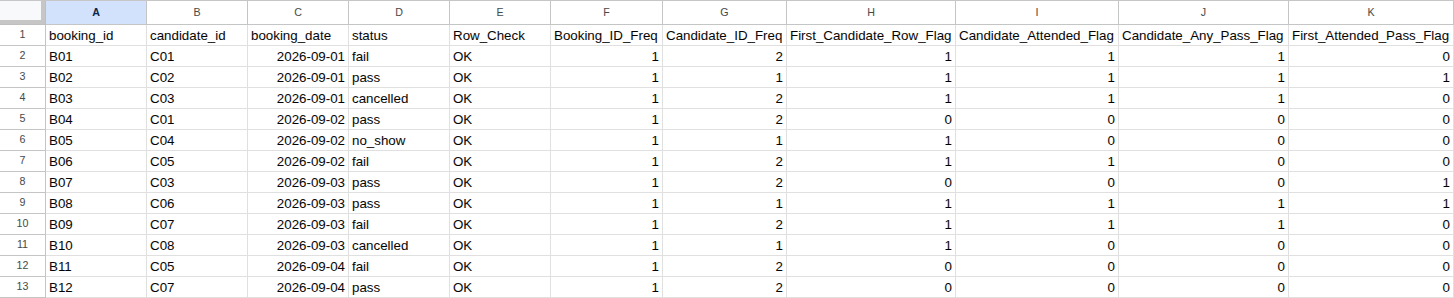
Column F shows 1 on every row, so booking_id is unique. Column G shows 2 on 8 rows, because C01, C03, C05, and C07 each booked twice. That rules out “one row equals one person.” A count can rule a key out, but can’t prove it right. A short extract can be unique by chance, so read the source system’s definition too.
“Duplicate” can mean two numbers here. Eight rows belong to candidates who booked twice, but only 4 rows are extra beyond each candidate’s first: 12 − 8 = 4. These are real rebookings and retakes. Don’t run Remove Duplicates on candidate_id in the raw table, or you’ll delete real exam results.
H2 to K2 turn the bookings into one answer per candidate:
| Cell | Marks a 1 when | Column total |
|---|---|---|
| H2 | It’s the candidate’s first row | 8 candidates |
| I2 | It’s the first row, and the candidate sat at least one test | 6 attended |
| J2 | It’s the first row, and the candidate has at least one pass | 5 with a pass |
| K2 | The row is a pass, and it was the candidate’s earliest test sat in this export | 3 first-test passes |
H2:
=IF(OR(NOT(EXACT(E2, "OK")), COUNT($G$2:$G$13)<12), "", IF(SUMPRODUCT(--EXACT($B$2:B2, B2))=1, 1, 0))
I2:
=IF(OR(NOT(EXACT(E2, "OK")), COUNT($H$2:$H$13)<12), "", IF(H2=0, 0, IF(SUMPRODUCT(--EXACT($B$2:$B$13, B2), --EXACT($D$2:$D$13, "pass"))+SUMPRODUCT(--EXACT($B$2:$B$13, B2), --EXACT($D$2:$D$13, "fail"))>0, 1, 0)))
J2:
=IF(OR(NOT(EXACT(E2, "OK")), COUNT($I$2:$I$13)<12), "", IF(H2=0, 0, IF(SUMPRODUCT(--EXACT($B$2:$B$13, B2), --EXACT($D$2:$D$13, "pass"))>0, 1, 0)))
K2:
=IF(OR(NOT(EXACT(E2, "OK")), COUNT($J$2:$J$13)<12), "", IF(AND(EXACT(D2, "pass"), SUMPRODUCT(--EXACT($B$2:$B$13, B2), --EXACT($D$2:$D$13, "pass"), --($C$2:$C$13<=C2))+SUMPRODUCT(--EXACT($B$2:$B$13, B2), --EXACT($D$2:$D$13, "fail"), --($C$2:$C$13<=C2))=1), 1, 0))
K2 compares dates across the whole column, so sorting the rows doesn’t change the result. Swap the B01 and B04 rows, and column K still adds up to 3.
With all 12 bookings in place, columns E to K should show:
| Row | booking_id | E | F | G | H | I | J | K |
|---|---|---|---|---|---|---|---|---|
| 2 | B01 | OK | 1 | 2 | 1 | 1 | 1 | 0 |
| 3 | B02 | OK | 1 | 1 | 1 | 1 | 1 | 1 |
| 4 | B03 | OK | 1 | 2 | 1 | 1 | 1 | 0 |
| 5 | B04 | OK | 1 | 2 | 0 | 0 | 0 | 0 |
| 6 | B05 | OK | 1 | 1 | 1 | 0 | 0 | 0 |
| 7 | B06 | OK | 1 | 2 | 1 | 1 | 0 | 0 |
| 8 | B07 | OK | 1 | 2 | 0 | 0 | 0 | 1 |
| 9 | B08 | OK | 1 | 1 | 1 | 1 | 1 | 1 |
| 10 | B09 | OK | 1 | 2 | 1 | 1 | 1 | 0 |
| 11 | B10 | OK | 1 | 1 | 1 | 0 | 0 | 0 |
| 12 | B11 | OK | 1 | 2 | 0 | 0 | 0 | 0 |
| 13 | B12 | OK | 1 | 2 | 0 | 0 | 0 | 0 |
| Total | 12 OK | 12 | 8 | 6 | 5 | 3 |
Step 2: Match Both Counts to the Question
Back to the four rates. The first two differ only in the denominator: 2 cancellations and 1 no-show were never sat. The third counts each attended candidate once, by their first test. C02, C03, and C06 passed their first recorded test in this export. C01 and C07 passed only on a retake, and C05 failed twice. The fourth also counts C04 and C08, who never sat a test.
A common worry is that retakes drag the booking rate down. A passed retake does the opposite. Without C01’s retake, B04, the table has 4 passes in 11 bookings: 4 ÷ 11 = 36.36%. Adding B04 raises the rate to 5 ÷ 12 = 41.67%. The booking rate gives repeat bookers more weight. It doesn’t punish a retake that passes.
This export covers September 1 to 4 only, so it can’t give a true first-attempt pass rate. C03 passed B07, but may have failed a test in August. It also can’t give a course-wide certification rate. That needs enrollment records, a defined follow-up window, and certification results, including students who never booked a test.
So which of the four is a good pass rate? None of them can be judged on its own. Before you compare any of them with another program’s number, find out which question that number answers.
Step 3: Reconcile the Counts and Check a Claimed Rate
I’ve seen business numbers that should agree drift apart across systems plenty of times. A pass rate copied into a slide is an easy place for it. This block checks a claimed rate against the booking table.
Put Metric, Verified_Extract_Benchmark, and Candidate_Claim_Audit in M1:O1, and the labels below in M2:M15. Type ALL_BOOKINGS in N4, and the starting values shown in O2:O13, with O2:O3 as real dates.
| Row | Label (M) | N shows | O starts as |
|---|---|---|---|
| 2 | Extract_Start_Date | 2026-09-01 (typed) | 2026-09-01 |
| 3 | Extract_End_Date | 2026-09-04 (typed) | 2026-09-04 |
| 4 | Claimed_Question_Scope | ALL_BOOKINGS (typed) | ALL_BOOKINGS |
| 5 | Invalid_Or_Blank_Row_Count | 0 | 0 |
| 6 | Total_Booking_Rows | 12 | NOT TESTED |
| 7 | Attended_Test_Count | 9 | NOT TESTED |
| 8 | Non_Attended_Booking_Count | 3 | NOT TESTED |
| 9 | Distinct_Booked_Candidates | 8 | NOT TESTED |
| 10 | Attended_Candidate_Count | 6 | NOT TESTED |
| 11 | Claim_Numerator_Count | 5 | NOT TESTED |
| 12 | Claim_Denominator_Count | 12 | NOT TESTED |
| 13 | Claim_Pass_Rate | 0.4167 | NOT TESTED |
| 14 | Exclusion_And_Rate_Gap | 0 | formula |
| 15 | Audit_Status | RECONCILED: 12 BOOKINGS … | formula |
Enter these in column N:
| Cell | Formula |
|---|---|
| N5 | =COUNTIF($E$2:$E$13, "<>OK")+COUNTBLANK($A$2:$A$13)+COUNTBLANK($B$2:$B$13)+COUNTBLANK($C$2:$C$13)+COUNTBLANK($D$2:$D$13) |
| N6 | =IF(OR(N5>0, COUNT($F$2:$F$13)<12, COUNT($G$2:$G$13)<12, COUNT($H$2:$H$13)<12, COUNT($I$2:$I$13)<12, COUNT($J$2:$J$13)<12, COUNT($K$2:$K$13)<12), "CHECK INPUTS", COUNTA($A$2:$A$13)) |
| N7 | =IF(NOT(ISNUMBER(N6)), "CHECK INPUTS", SUMPRODUCT(--EXACT($D$2:$D$13, "pass"))+SUMPRODUCT(--EXACT($D$2:$D$13, "fail"))) |
| N8 | =IF(NOT(ISNUMBER(N6)), "CHECK INPUTS", SUMPRODUCT(--EXACT($D$2:$D$13, "cancelled"))+SUMPRODUCT(--EXACT($D$2:$D$13, "no_show"))) |
| N9 | =IF(NOT(ISNUMBER(N6)), "CHECK INPUTS", SUM($H$2:$H$13)) |
| N10 | =IF(NOT(ISNUMBER(N6)), "CHECK INPUTS", SUM($I$2:$I$13)) |
| N13 | =IF(OR(NOT(ISNUMBER(N6)), NOT(ISNUMBER(N11)), NOT(ISNUMBER(N12)), N12<=0), "CHECK INPUTS", ROUND(N11/N12, 4)) |
| N14 | =IF(NOT(ISNUMBER(N6)), "CHECK INPUTS", ROUND(ABS((N7+N8)-N6)+ABS(N6-ROWS($A$2:$A$13))+COUNTIF($F$2:$F$13, ">1"), 4)) |
N11 and N12 pick the numerator and denominator for the question named in O4.
N11:
=IF(NOT(ISNUMBER(N6)), "CHECK INPUTS", IF(EXACT(O4, "ALL_BOOKINGS"), SUMPRODUCT(--EXACT($D$2:$D$13, "pass")), IF(EXACT(O4, "ATTENDED_TESTS"), SUMPRODUCT(--EXACT($D$2:$D$13, "pass")), IF(EXACT(O4, "FIRST_ATTENDED_CANDIDATES"), SUM($K$2:$K$13), IF(EXACT(O4, "BOOKED_CANDIDATES_ANY_PASS"), SUM($J$2:$J$13), "CHECK SCOPE")))))
N12:
=IF(NOT(ISNUMBER(N6)), "CHECK INPUTS", IF(EXACT(O4, "ALL_BOOKINGS"), N6, IF(EXACT(O4, "ATTENDED_TESTS"), N7, IF(EXACT(O4, "FIRST_ATTENDED_CANDIDATES"), N10, IF(EXACT(O4, "BOOKED_CANDIDATES_ANY_PASS"), N9, "CHECK SCOPE")))))
N15 writes the status:
=IF(OR(N5>0, NOT(ISNUMBER(N6)), NOT(ISNUMBER(N13)), NOT(ISNUMBER(N14))), "STOP: CHECK SOURCE OR SCOPE", IF(COUNTIF($F$2:$F$13, ">1")>0, "STOP: DUPLICATE BOOKING IDS IN SOURCE", IF(N14<>0, "STOP: SOURCE EXCLUSION GAP", "RECONCILED: " & N6 & " BOOKINGS (" & N7 & " ATTENDED + " & N8 & " NON-ATTENDED) ACROSS " & N9 & " CANDIDATES")))
N5 is a stop signal, not a count of bad rows: a row with two blank cells adds 3. Anything above 0 means fix the source first. N6 waits until every helper cell in F:K holds a number. That catches a cleared formula, not one typed over with a number, so keep the formulas live. N14 should be 0: attended plus non-attended equals all bookings, and no booking_id repeats. N15 should read RECONCILED: 12 BOOKINGS (9 ATTENDED + 3 NON-ATTENDED) ACROSS 8 CANDIDATES.
Copy O14 and O15 from the formula reference. With O6:O13 still NOT TESTED, O15 says NOT TESTED: ENTER CANDIDATE CLAIM VALUES.
Now test each claim below. Type only into O4 and O6:O13, replacing all of them each time. Keep the dates in O2:O3 and 0 in O5. Every test uses O6 = 12, O7 = 9, O8 = 3, O9 = 8, and O10 = 6, except the last. Format N13, O13, and O14 to four decimals first, or Google Sheets shows 0.5 instead of 0.5000.
| Claim | O4 | O11 | O12 | O13 | O14 shows | O15 shows |
|---|---|---|---|---|---|---|
| "41.7% of students are passing" | BOOKED_CANDIDATES_ANY_PASS | 5 | 12 | 0.4167 | 4.2083 | STOP: ROW GRAIN MISMATCH (12 BOOKINGS USED FOR 8 CANDIDATES) |
| "55.56% of bookings passed: 5 ÷ 9" | ALL_BOOKINGS | 5 | 9 | 0.5556 | 3.1389 | STOP: DENOMINATOR MISMATCH (9 ATTENDED TESTS USED FOR 12 BOOKINGS) |
| "41.67% of tests taken passed: 5 ÷ 12" | ATTENDED_TESTS | 5 | 12 | 0.4167 | 3.1389 | STOP: DENOMINATOR MISMATCH (12 BOOKINGS INCLUDES 3 NON-ATTENDED) |
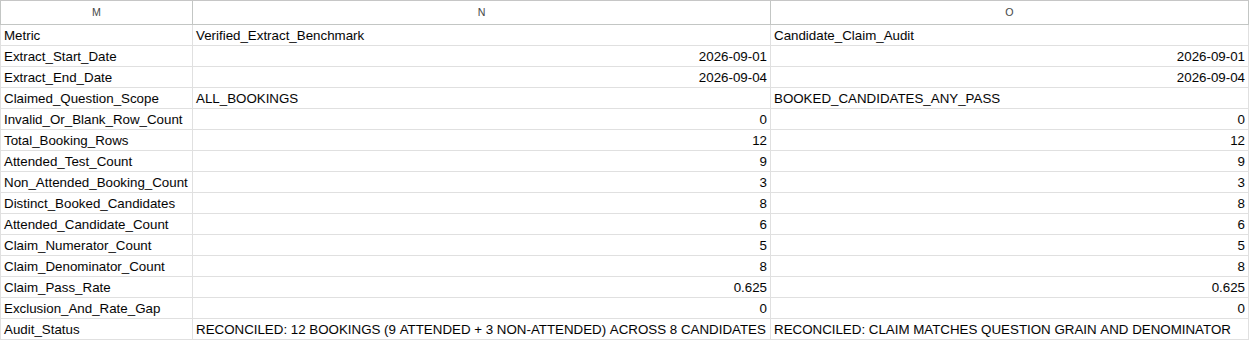
| "50% of attended candidates passed their first recorded test in this export" | FIRST_ATTENDED_CANDIDATES | 3 | 6 | 0.5000 | 0.0000 | RECONCILED: CLAIM MATCHES QUESTION GRAIN AND DENOMINATOR |
| "62.5% of candidates have a recorded pass" | BOOKED_CANDIDATES_ANY_PASS | 5 | 8 | 0.6250 | 0.0000 | RECONCILED: CLAIM MATCHES QUESTION GRAIN AND DENOMINATOR |
| 41.67% of bookings, with O7 = 8 and O8 = 4 | ALL_BOOKINGS | 5 | 12 | 0.4167 | 2.0000 | STOP: SUPPORTING SUMMARY COUNT MISMATCH VS SOURCE |
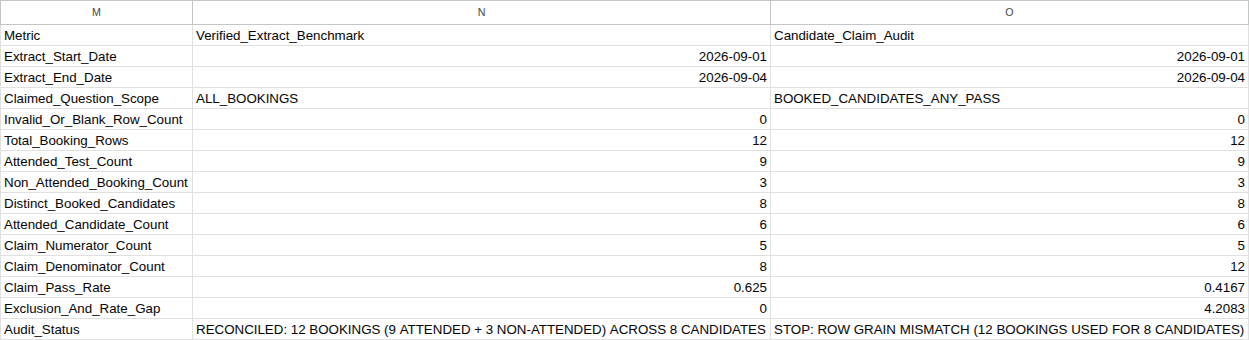
The first claim divides by bookings but talks about students. The second and third use the right numerator with the wrong denominator for the words in the claim. Two cancellations and a no-show are not tests taken. The two sound claims pass, so the check doesn’t reject a correct number just because it differs from 41.67%.
The last claim is harder to spot. Its 8 attended and 4 non-attended still add up to 12, so it agrees with itself. O15 stops it because 8 and 4 don’t match the 9 and 3 in column N.
O14 compares rates rounded to four decimals, so “matches” means equal at that precision. To see an input mistake, start from the 62.5% claim and type ‘2026-09-01 in O2, with a leading apostrophe. That stores text, which can look like a date. In a spare cell such as Q2, =ISNUMBER(O2) returns FALSE, and O15 says STOP: EXTRACT WINDOW MISMATCH. Then enter =DATE(2026,9,1) in O2. Check that Q2 says TRUE and O15 says RECONCILED again, then clear Q2.
Before you report a rate, column E must say OK on every row, and N15 and O15 must both start with RECONCILED. Treat any STOP message or spreadsheet error, like #VALUE!, as a stop, never a pass. The block checks this layout with clean inputs. It can’t tell you whether the export itself is complete.
These formulas work in Google Sheets and Excel for the web with US English settings.
Adapting the Sheet to More Bookings
For 20 bookings, in this order:
- Enter the new bookings in A14:D21. Don’t insert whole rows, which would shift M:O.
- Select E2:O15 and use Find and Replace, searching inside formulas. Replace
$13with$21(291 places), then<12with<20(78 places). - Only then fill E2:K2 down to row 21, and check that column E says
OKon every row.
If you fill first, rows 16 to 21 keep checking only rows 2 to 13. For fewer bookings, replace with the smaller numbers, then clear the unused rows in A:K only. Never replace a bare 12 or 13, which would break N12, N13, O12, and O13.
What to Say in the Room
Try: “That 41.7% counts all 12 bookings, including two cancellations, a no-show, and retakes. Of the 9 tests actually sat, 55.6% were passes. Of the 8 candidates with a test scheduled September 1 to 4, 62.5% have a recorded pass in this export.”
Then agree on which question the meeting needs answered, and report that one number with its denominator.
What to Do Next
For order lines, What Does One Row Represent in Your Sales Spreadsheet? covers repeated order totals. For customers, Calculate Repeat-Customer Rate from an Order Export divides by customers, not order rows. To see how your metrics, data, and reports hold up more broadly, try the SMB analytics self-assessment.
This is the first Grain First article, a series on reading what one row represents. Its practice lessons are still being built.
Copy-Paste Formula Reference
E2, the row check. Fill it down to E13:
=IF(OR(COUNTA(A2:D2)<4, NOT(ISTEXT(A2)), NOT(ISTEXT(B2)), NOT(ISNUMBER(C2)), NOT(ISTEXT(D2)), NOT(ISNUMBER($N$2)), NOT(ISNUMBER($N$3)), TRIM(SUBSTITUTE(A2, CHAR(160), " "))="", TRIM(SUBSTITUTE(B2, CHAR(160), " "))="", NOT(EXACT(A2, TRIM(SUBSTITUTE(A2, CHAR(160), " ")))), NOT(EXACT(B2, TRIM(SUBSTITUTE(B2, CHAR(160), " ")))), NOT(EXACT(A2, UPPER(A2))), NOT(EXACT(B2, UPPER(B2))), NOT(ISERROR(FIND(" ", A2&B2))), NOT(ISERROR(FIND("*", A2&B2))), NOT(ISERROR(FIND("?", A2&B2))), NOT(ISERROR(FIND("~", A2&B2))), NOT(ISERROR(FIND("=", A2&B2))), NOT(ISERROR(FIND("<", A2&B2))), NOT(ISERROR(FIND(">", A2&B2))), NOT(OR(EXACT(D2, "pass"), EXACT(D2, "fail"), EXACT(D2, "cancelled"), EXACT(D2, "no_show")))), "CHECK ROW", IF(OR(INT($N$2)<>$N$2, INT($N$3)<>$N$3, $N$2<DATE(2000,1,1), $N$3>DATE(2100,1,1), $N$3<$N$2, INT(C2)<>C2, C2<$N$2, C2>$N$3, SUMPRODUCT(--EXACT($B$2:$B$13, B2), --($C$2:$C$13=C2))>1), "CHECK ROW", "OK"))
O14, the gap between the claim and the booking table:
=IF(OR(N5>0, NOT(ISNUMBER(N6)), NOT(ISNUMBER(N14)), COUNTIF($F$2:$F$13, ">1")>0, N14<>0, NOT(ISNUMBER(O2)), NOT(ISNUMBER(O3)), NOT(ISNUMBER(O5)), NOT(ISNUMBER(N13))), "CHECK INPUTS", IF(OR(INT(O2)<>O2, INT(O3)<>O3, O2<>N2, O3<>N3, INT(O5)<>O5, O5<>0), "CHECK INPUTS", IF(AND(EXACT(O6, "NOT TESTED"), EXACT(O7, "NOT TESTED"), EXACT(O8, "NOT TESTED"), EXACT(O9, "NOT TESTED"), EXACT(O10, "NOT TESTED"), EXACT(O11, "NOT TESTED"), EXACT(O12, "NOT TESTED"), EXACT(O13, "NOT TESTED")), "NOT TESTED", IF(OR(NOT(ISNUMBER(O6)), NOT(ISNUMBER(O7)), NOT(ISNUMBER(O8)), NOT(ISNUMBER(O9)), NOT(ISNUMBER(O10)), NOT(ISNUMBER(O11)), NOT(ISNUMBER(O12)), NOT(ISNUMBER(O13))), "CHECK INPUTS", IF(OR(INT(O6)<>O6, O6<=0, INT(O7)<>O7, O7<0, INT(O8)<>O8, O8<0, INT(O9)<>O9, O9<0, INT(O10)<>O10, O10<0, INT(O11)<>O11, O11<0, INT(O12)<>O12, O12<=0, O13<0), "CHECK INPUTS", ROUND(ABS(O6-N6)+ABS(O7-N7)+ABS(O8-N8)+ABS(O9-N9)+ABS(O10-N10)+ABS(O11-N11)+ABS(O12-N12)+ABS(O13-N13)+ABS(O13-ROUND(O11/O12, 4))+ABS((O7+O8)-O6), 4))))))
O15, the claim’s status:
=IF(OR(N5>0, NOT(ISNUMBER(N6))), "STOP: INVALID OR BLANK SOURCE ROWS", IF(COUNTIF($F$2:$F$13, ">1")>0, "STOP: DUPLICATE BOOKING IDS IN SOURCE", IF(OR(NOT(ISNUMBER(N14)), N14<>0), "STOP: SOURCE EXCLUSION GAP", IF(IF(AND(ISNUMBER(O2), ISNUMBER(O3)), OR(INT(O2)<>O2, INT(O3)<>O3, O2<>N2, O3<>N3), TRUE), "STOP: EXTRACT WINDOW MISMATCH", IF(EXACT(N11, "CHECK SCOPE"), "STOP: UNKNOWN QUESTION SCOPE", IF(IF(ISNUMBER(O5), OR(INT(O5)<>O5, O5<>0), TRUE), "STOP: INVALID CLAIM ROW-CHECK COUNT", IF(EXACT(O14, "NOT TESTED"), "NOT TESTED: ENTER CANDIDATE CLAIM VALUES", IF(EXACT(O14, "CHECK INPUTS"), "STOP: NON-NUMERIC, NEGATIVE, OR NON-INTEGER CLAIM INPUTS", IF(ROUND(ABS((O7+O8)-O6), 4)>0, "STOP: UNRECONCILED EXCLUSIONS (ATTENDED + NON-ATTENDED <> BOOKINGS)", IF(OR(O6<>N6, O7<>N7, O8<>N8, O9<>N9, O10<>N10), "STOP: SUPPORTING SUMMARY COUNT MISMATCH VS SOURCE", IF(AND(EXACT(O4, "BOOKED_CANDIDATES_ANY_PASS"), O12=N6, N6<>N9), "STOP: ROW GRAIN MISMATCH (" & N6 & " BOOKINGS USED FOR " & N9 & " CANDIDATES)", IF(AND(EXACT(O4, "ALL_BOOKINGS"), O12=N7, N7<>N6), "STOP: DENOMINATOR MISMATCH (" & N7 & " ATTENDED TESTS USED FOR " & N6 & " BOOKINGS)", IF(AND(EXACT(O4, "ATTENDED_TESTS"), O12=N6, N6<>N7), "STOP: DENOMINATOR MISMATCH (" & N6 & " BOOKINGS INCLUDES " & N8 & " NON-ATTENDED)", IF(O12<>N12, "STOP: DENOMINATOR COUNT MISMATCH FOR QUESTION SCOPE", IF(O11<>N11, "STOP: NUMERATOR COUNT MISMATCH FOR QUESTION SCOPE", IF(O14=0, "RECONCILED: CLAIM MATCHES QUESTION GRAIN AND DENOMINATOR", "STOP: PASS RATE ROUNDING OR SUMMARY MISMATCH"))))))))))))))))