
To build an accounts receivable aging schedule in Excel or Google Sheets, start from an invoice register with payments applied through your close date. Type that close date as a fixed value, not TODAY(). Subtract payments from each invoice amount, count the days past each due date, and sort every open invoice into one of five buckets: Current, 1-30, 31-60, 61-90, and 91+. Then check that the buckets add back to the register.
In the example below, eight open invoices total $16,500.00 on April 30, and $4,000.00 of that is more than 60 days past due. The buckets tie to the register with a $0.00 gap. That check is internal. Before you call the schedule reconciled, compare the total with the accounts receivable balance in your accounting system for the same date.
My preferred tool is Google Sheets because a spreadsheet should be shareable and make collaboration easy. Every formula below also works in Excel for the web. The two tools differ in two places, both noted below: how they display a 1-30 label that has turned into a date, and one Find and Replace setting.
The results below come from a test of this exact workbook in Google Sheets and Excel for the web, both in US English.
The 10-Invoice Register and the Five-Bucket Summary
Below is the 10-invoice register I had generated for this article. It sits on one worksheet named AR_Aging, with headings in A1:K1 and invoices in rows 2 to 11. The as-of date, April 30, 2026, is typed into S2. Columns A to F are inputs. Columns I to K are helper formulas, explained in Steps 1 and 2. Column F holds payments applied through April 30, not payments received since.
| Row | invoice_id (A) | customer_name (B) | invoice_date (C) | due_date (D) | invoice_amount_usd (E) | payments_applied_as_of_usd (F) | Open_Balance_USD (I) | Days_Past_Due (J) | Aging_Bucket (K) |
|---|---|---|---|---|---|---|---|---|---|
| 2 | INV-7901 | Acme Supply | 2026-04-15 | 2026-05-15 | $3,000.00 | $0.00 | $3,000.00 | -15 | Current |
| 3 | INV-7902 | Beacon Labs | 2026-04-01 | 2026-04-30 | $2,000.00 | $0.00 | $2,000.00 | 0 | Current |
| 4 | INV-7903 | Cedar Works | 2026-03-16 | 2026-04-15 | $2,500.00 | $500.00 | $2,000.00 | 15 | 1-30 |
| 5 | INV-7904 | Delta Print | 2026-03-01 | 2026-03-31 | $1,500.00 | $0.00 | $1,500.00 | 30 | 1-30 |
| 6 | INV-7905 | Elm Logistics | 2026-02-28 | 2026-03-30 | $2,200.00 | $0.00 | $2,200.00 | 31 | 31-60 |
| 7 | INV-7906 | Fox Catering | 2026-01-30 | 2026-03-01 | $1,800.00 | $0.00 | $1,800.00 | 60 | 31-60 |
| 8 | INV-7907 | Grove Design | 2026-01-15 | 2026-02-14 | $2,500.00 | $0.00 | $2,500.00 | 75 | 61-90 |
| 9 | INV-7908 | Harbor Tech | 2025-12-15 | 2026-01-14 | $1,500.00 | $0.00 | $1,500.00 | 106 | 91+ |
| 10 | INV-7909 | Iris Studio | 2026-03-10 | 2026-04-09 | $4,000.00 | $4,000.00 | $0.00 | 21 | PAID |
| 11 | INV-7910 | Jade Retail | 2026-01-05 | 2026-02-04 | $1,000.00 | $1,000.00 | $0.00 | 85 | PAID |

Billing totals $22,000.00. Payments applied through April 30 total $5,500.00. That is $5,000.00 on the two invoices paid in full, plus a $500.00 partial payment on INV-7903. The remaining $16,500.00 is open across eight invoices.
The summary block in M1:P7 groups those eight invoices by age:
| Aging_Bucket (M) | Open_Invoice_Count (N) | Open_Balance_USD (O) | Share_Of_Open_AR (P) |
|---|---|---|---|
| Current | 2 | $5,000.00 | 30.30% |
| 1-30 | 2 | $3,500.00 | 21.21% |
| 31-60 | 2 | $4,000.00 | 24.24% |
| 61-90 | 1 | $2,500.00 | 15.15% |
| 91+ | 1 | $1,500.00 | 9.09% |
| Total_Open_AR | 8 | $16,500.00 | 100.00% |
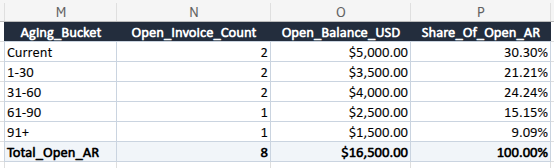
“Past 60 days” here means the 61-90 and 91+ buckets together: $4,000.00, or 24.24% of open AR. The share column stores a ratio rounded to four decimals, such as 0.3030, and displays it as a percentage.
Here is how five common shortcuts change the same April 30 report:
| Method | Open invoices | Current | Past 60 days | Bucket total | What goes wrong |
|---|---|---|---|---|---|
| Correct: due date, open balance | 8 | $5,000.00 | $4,000.00 | $16,500.00 | Nothing; ties to the register |
| 1. Age from the invoice date | 8 | $0.00 | $8,000.00 | $16,500.00 | Counts days since billing, not days late |
| 2. Use the gross billed amount | 10 | $5,000.00 | $5,000.00 | $22,000.00 | Ignores $5,500.00 in payments |
| 3. Overlapping bucket limits | 10 | $5,000.00 | $5,800.00 | $19,800.00 | Counts the day-30 and day-60 invoices twice |
4. TODAY(), reopened May 15 |
8 | $3,000.00 | $5,800.00 | $16,500.00 | The April report changes after the close |
| 5. Paid invoices counted as open | 10 | $5,000.00 | $4,000.00 | $16,500.00 | Two paid invoices inflate the workload |
Three of the five shortcuts leave the total at $16,500.00. A check on the total alone would pass them. That is why the audit later in this article compares every bucket and the invoice count, not only the total.
Step 1: Lock the As-Of Date and Use a Dated Payment Extract
Each invoice’s open balance is the invoice amount minus payments applied. Column I calculates it, rounded to cents, and stays blank if the row fails its check in column G:
=IF(NOT(EXACT(G2, "OK")), "", ROUND(E2-F2, 2))
Enter it in I2 and fill down through row 11.
Type the as-of date instead of using TODAY()
The aging date in S2 must be a typed date, not a formula. TODAY() recalculates every time the file opens. If the April schedule used TODAY() and someone reopened it on May 15, Current would fall from $5,000.00 to $3,000.00. Past 60 days would rise from $4,000.00 to $5,800.00. No invoice or payment would have changed.
The verdict cell S18 uses ISFORMULA to check S2 (Google Sheets ISFORMULA, Microsoft Excel ISFORMULA). If S2 holds any formula, even one that returns April 30, the sheet stops with STOP: ENTER STATIC AS-OF DATE IN S2 (NEVER VOLATILE TODAY()).
Pull payments through the same cutoff
A typed date in S2 fixes how old each invoice is. It does not fix the payments. Column F is a running total of payments for each invoice, and it has no payment dates.
Suppose Acme Supply pays $1,000.00 on May 1, and someone types it into F2 before the April schedule is finished. Open AR drops to $15,500.00, and the schedule still ties out. S2 still says April 30, but the April 30 balance was $16,500.00. If you try this on your copy, set F2 back to 0 before you continue.
So pull column F from your accounting system as payments applied through the close date. Save that extract with the date in its file name. Microsoft’s documentation for the Dynamics 365 customer aging report draws the same line. The date used to age invoices is separate from the cutoff date for the transactions in the balance (Microsoft Dynamics 365 customer aging report).
If you need to rebuild several past closes from one sheet, a dated log of payment applications works better. Keep one row for each time a payment is applied to an invoice, not one row per receipt. Each row needs the invoice ID, the amount applied, and the accounting date your system uses for that application. For example, a $1,000.00 receipt split across two invoices becomes two rows, $600.00 and $400.00, each reducing its own invoice as of its own application date. For each close, total only the applications dated on or before the close date. That variant is not part of the worksheet in this article. To keep each finished month exactly as it was, save a copy as described in Save a Month-End Spreadsheet Snapshot Without Breaking Formulas.
Step 2: Age Each Invoice From Its Due Date
Spreadsheets store dates as day numbers, so subtracting one date from another gives a count of days. Column J subtracts the due date from the as-of date:
=IF(NOT(EXACT(G2, "OK")), "", $S$2-D2)
A negative result means the invoice is not due yet. INV-7901 is due May 15, so it shows -15 on April 30.
Column K assigns the bucket:
=IF(NOT(EXACT(G2, "OK")), "", IF(I2=0, "PAID", IF(J2<=0, "Current", IF(J2<=30, "1-30", IF(J2<=60, "31-60", IF(J2<=90, "61-90", "91+"))))))
Enter J2 and K2 and fill both down through row 11. K checks for a paid invoice first. Then it tests each upper limit in order and stops at the first one that is true. Each day count can only land in one bucket:
| Days past due | Bucket |
|---|---|
| -15 | Current |
| 0 | Current |
| 1 | 1-30 |
| 30 | 1-30 |
| 31 | 31-60 |
| 60 | 31-60 |
| 61 | 61-90 |
| 90 | 61-90 |
| 91 | 91+ |
In the test, a set of due dates at each of these points landed in the bucket shown in both tools. The register itself has invoices at 0, 30, 31, and 60 days. An invoice due on the as-of date is Current. It becomes one day past due the next day.
Why invoice-date aging overstates late invoices
Aging from the invoice date measures days outstanding, not days past due. A Net-30 invoice is zero days old on the day you issue it. It normally becomes one day past due the day after its due date. Measured from the invoice date, each Net-30 invoice in this register shows an age roughly 30 days greater than its days past due.
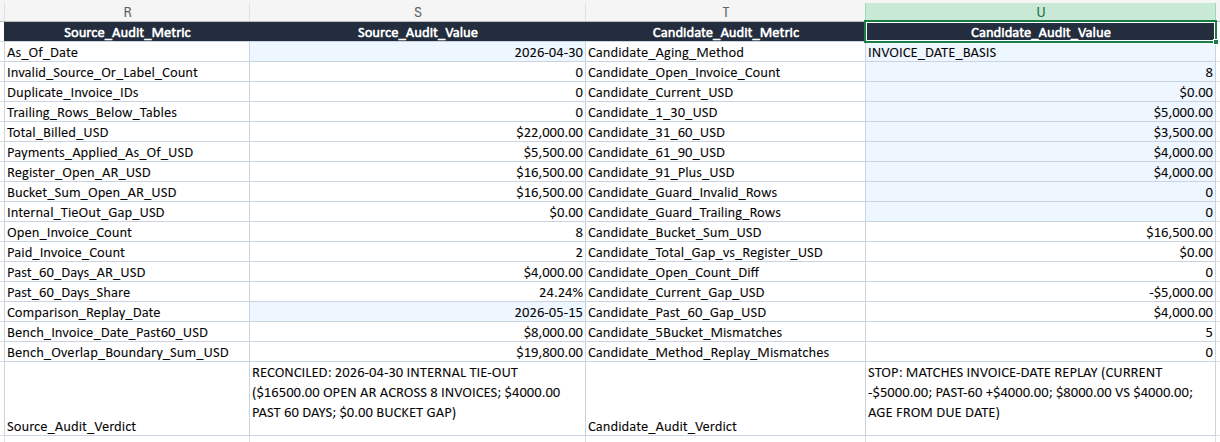
On this register, that shift empties Current, from $5,000.00 to $0.00. It doubles past 60 days, from $4,000.00 to $8,000.00. Days outstanding can be a useful number. Just don’t label it “past due”.
Why overlapping limits count invoices twice
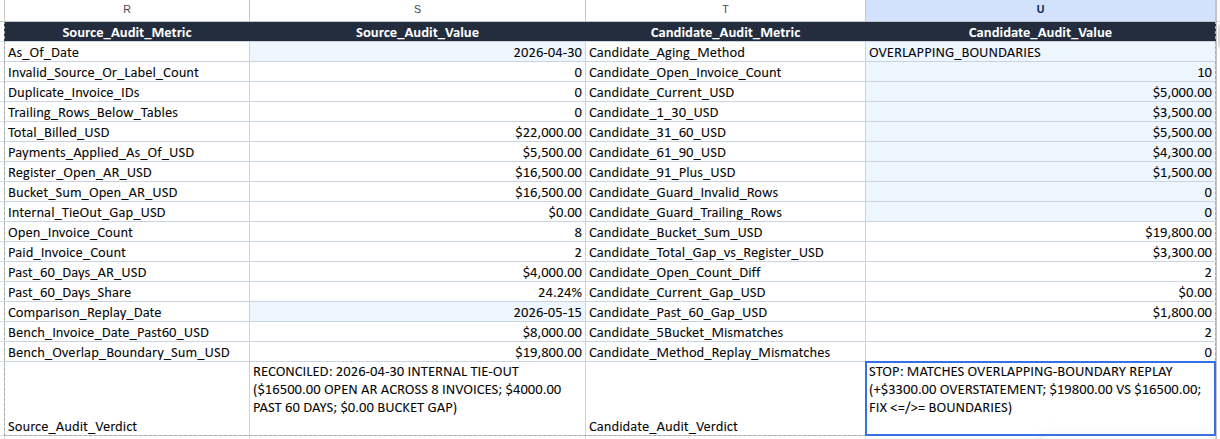
A common shortcut writes the 1-30 test as “30 or fewer days” and the 31-60 test as “30 or more days”. INV-7904, at exactly 30 days, then lands in both buckets. INV-7906, at exactly 60 days, lands in both 31-60 and 61-90. The buckets total $19,800.00, which is $3,300.00 more than the register. Past 60 days shows $5,800.00. The nested IF in column K avoids this, because each invoice gets exactly one label.
What the row check in column G accepts
Column G returns OK or CHECK ROW for each invoice. Columns I, J, and K only calculate for OK rows. A row passes when:
- All six input cells are filled, with text in
AandBand numbers inCtoF. - The invoice ID is INV- plus 2 to 6 digits, in capitals, with no spaces.
- The customer name is not blank and has no leading, trailing, or double spaces. Ordinary names with spaces, such as Acme Supply, pass.
- Both dates are whole dates between January 1, 2000 and January 1, 2100. The due date is not before the invoice date, and the invoice date is not after
S2. - The invoice amount is above $0.00, and payments are between $0.00 and the invoice amount. Both are in whole cents.
Column H counts how often each invoice ID appears, so a duplicate ID stops the report. Column K labels the two paid invoices PAID, and the bucket counts leave them out.
Step 3: Tie Out the Buckets, Then Compare With Your Ledger
Each bucket row in M2:M6 has three formulas. N counts invoices with that label, using COUNTIF. O adds their open balances, using SUMIFS. P divides by the total. For example, O2 is:
=IF(OR(S3>0, S4>0, S5>0), "CHECK INPUTS", ROUND(SUMIFS($I$2:$I$11, $K$2:$K$11, M2), 2))
Row 7 adds the five rows. Both functions match the label in column M against column K (Google Sheets SUMIFS, Microsoft Excel SUMIFS, Google Sheets COUNTIF, Microsoft Excel COUNTIF). Each row has its own formula in the reference at the end. Do not fill down from row 2, because the guard references S3, S4, and S5 must stay the same in every row.
Store the bucket labels as text
The labels in M2:M6 must be text. Typing 1-30 into an unformatted cell turns it into a date in both tools, but the two tools show it differently:
- Excel for the web: The cell changed to 30-Jan right away. It stored January 30, 2026, as a date.
- Google Sheets: The cell stored the same date, January 30, 2026, but kept displaying 1-30. The only visible clue was right alignment.
In both tools, COUNTIF still matched the date-coerced label to the two 1-30 invoices. So a sheet without a check would look correct in Google Sheets while the cell held a date. That date can surface later, for example in a CSV export.
To avoid it, format M2:M6 as text before typing. In Google Sheets, use Format > Number > Plain text. In Excel for the web, use Home > Number > Text. You can also type the label with a leading apostrophe, as ‘1-30. Both produced real text in the test.
S3 checks that every label in M2:M7 is text and spelled exactly as expected, in the expected row. A date-coerced 1-30 stops the sheet. So does a swapped label, such as Current and 61-90 trading places. The stop reads STOP: CHECK BUCKET LABELS AND ORDER IN M2:M7 (MUST BE Current, 1-30, 31-60, 61-90, 91+, Total_Open_AR).
Read the internal tie-out
The source half of the audit block, R1:S18, compares the buckets with the register. S8 adds the open balances in column I. S9 takes the bucket total from O7. S10 shows the gap between them. S18 also checks that the bucket count in N7 equals the open invoice count in S11. On the baseline register, S18 returns:
RECONCILED: 2026-04-30 INTERNAL TIE-OUT ($16500.00 OPEN AR ACROSS 8 INVOICES; $4000.00 PAST 60 DAYS; $0.00 BUCKET GAP)
That verdict shows the buckets account for every open dollar in the register. It does not show that the register is complete or correct. Before you report the schedule, compare S8 with the accounts receivable control balance in your general ledger for the same date and the same customers. If they differ, look for invoices missing from the extract and payments posted after the cutoff. Also look for ledger items that never appear in an invoice register, such as credit memos or unapplied customer deposits. Work through those with your bookkeeper.
Two more cells give benchmarks for the comparison table above. S16 shows past 60 days measured from invoice dates ($8,000.00). S17 shows the overlapping-limits bucket total ($19,800.00).
Act before invoices pass 60 days
The $4,000.00 already past 60 days needs follow-up now. The earlier buckets deserve attention too. I personally like to set this up so that accounts receivable is sending reminders or talking to customers, so the business knows ahead of time what might lag and invoices don’t go past 60 days. In this example, that outreach list is the 1-30 bucket ($3,500.00 across two invoices) and the 31-60 bucket ($4,000.00 across two invoices). Keep it separate from the two invoices already past 60 days. For how collections fit with other service-firm measures, such as days sales outstanding, see KPIs for a Small Professional Services Firm.
Check an Aging Report Someone Else Built
The candidate half of the audit block, T1:U18, checks a schedule from somewhere else, such as your accounting software or a colleague’s file. Type its figures into U2:U10:
U2: the method you think the report used.U3: its open invoice count.U4:U8: its five bucket balances, from Current to 91+.U9andU10: 0. These two guard cells must stay at 0.
Type plain values without dollar signs or commas. Never use formulas in U2:U10, because U11 rejects formula inputs. U11 adds the five balances. U12:U16 measure the gaps: total, count, Current, past 60 days, and how many of the five buckets differ from the register.
U17 replays the method you selected, using the register. It counts how many of six fields differ from that replay: the invoice count plus all five balances. U18 confirms a replay match only when the count and all five balances agree. If any field differs, U18 still names the method it compared, but it reports only the measured differences and does not confirm a match.
To replay a shortcut, type the values from one row below into U2:U10, top to bottom. Leave out the Scenario column. If you copy a row from another sheet, paste it transposed. Type the text entries without quote marks.
| Scenario | U2 (Method) | U3 | U4 | U5 | U6 | U7 | U8 | U9 | U10 |
|---|---|---|---|---|---|---|---|---|---|
| Initial untested | NOT TESTED | NOT TESTED | NOT TESTED | NOT TESTED | NOT TESTED | NOT TESTED | NOT TESTED | 0 | 0 |
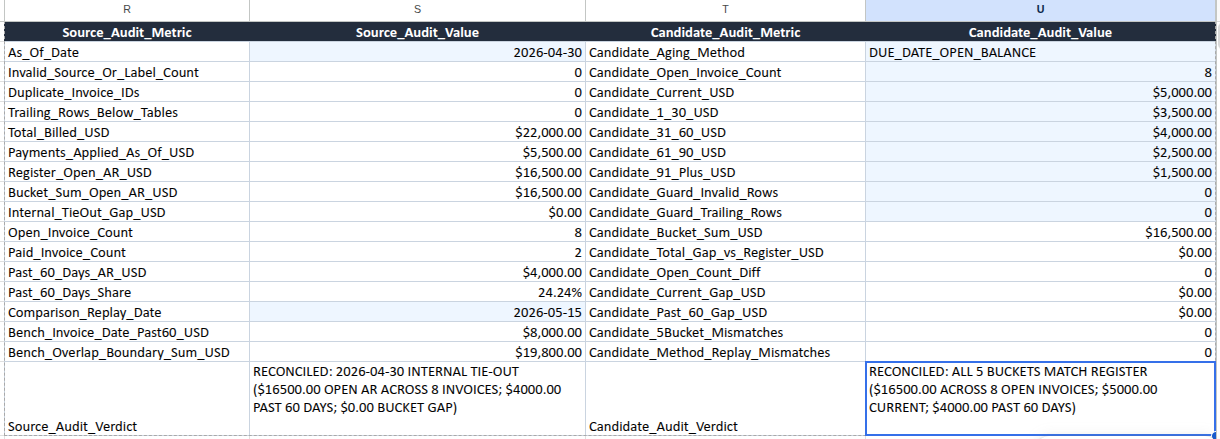
| Correct schedule | DUE_DATE_OPEN_BALANCE | 8 | 5000.00 | 3500.00 | 4000.00 | 2500.00 | 1500.00 | 0 | 0 |
| 1. Invoice date | INVOICE_DATE_BASIS | 8 | 0.00 | 5000.00 | 3500.00 | 4000.00 | 4000.00 | 0 | 0 |
| 2. Gross billed | GROSS_BILLED_UNPAID | 10 | 5000.00 | 8000.00 | 4000.00 | 3500.00 | 1500.00 | 0 | 0 |
| 3. Overlapping limits | OVERLAPPING_BOUNDARIES | 10 | 5000.00 | 3500.00 | 5500.00 | 4300.00 | 1500.00 | 0 | 0 |
| 4. TODAY(), May 15 | VOLATILE_TODAY_DRIFT | 8 | 3000.00 | 4000.00 | 3700.00 | 4300.00 | 1500.00 | 0 | 0 |
| 5. Paid counted as open | DUE_DATE_OPEN_BALANCE | 10 | 5000.00 | 3500.00 | 4000.00 | 2500.00 | 1500.00 | 0 | 0 |
U18 returned these verdicts in both tools:
- Initial untested:
NOT TESTED: ENTER CANDIDATE REPORT TOTALS - Correct schedule:
RECONCILED: ALL 5 BUCKETS MATCH REGISTER ($16500.00 ACROSS 8 OPEN INVOICES; $5000.00 CURRENT; $4000.00 PAST 60 DAYS) - 1. Invoice date:
STOP: MATCHES INVOICE-DATE REPLAY (CURRENT -$5000.00; PAST-60 +$4000.00; $8000.00 VS $4000.00; AGE FROM DUE DATE) - 2. Gross billed:
STOP: MATCHES GROSS-BILLED REPLAY (+$5500.00 OVERSTATEMENT VS $16500.00 REGISTER; SUBTRACT $5500.00 APPLIED PAYMENTS) - 3. Overlapping limits:
STOP: MATCHES OVERLAPPING-BOUNDARY REPLAY (+$3300.00 OVERSTATEMENT; $19800.00 VS $16500.00; FIX <=/>= BOUNDARIES) - 4. TODAY(), May 15:
STOP: MATCHES 2026-05-15 REPLAY (CURRENT -$2000.00; PAST-60 +$1800.00; INSPECT CANDIDATE AS-OF DATE FORMULA) - 5. Paid counted as open:
STOP: OPEN INVOICE COUNT MISMATCH (10 VS 8 OPEN INVOICES; EXCLUDE PAID $0.00 ROWS)
A match is not proof of a cause
The May 15 verdict says the report’s numbers match the register aged on May 15, the comparison date typed into S15. It does not prove the report used TODAY(). Someone could have typed May 15 by mistake. To find out, open the report and look at the formula behind its as-of date. If you change S15 to June 1, 2026, keep VOLATILE_TODAY_DRIFT and a count of 8, and enter the June 1 balances (0.00, 3000.00, 4000.00, 3700.00, and 5800.00), U18 names the June 1 replay instead. Like S2, S15 must be a typed date, and it must be later than S2. When you finish, retype 2026-05-15 in S15 as a date, because the next example depends on it.
A partial match is never confirmed. With S15 back at May 15, enter VOLATILE_TODAY_DRIFT, 8, 5000.00, 4000.00, 3500.00, 2500.00, 1500.00, 0, and 0 down U2:U10. That is the correct April 30 schedule with the 1-30 and 31-60 balances swapped. Two of those balances happen to equal the May 15 replay. U18 still stops with STOP: CANDIDATE DOES NOT MATCH 2026-05-15 REPLAY (3 OF 6 FIELDS DIFFER; REGISTER GAP $0.00; COUNT DIFF 0; 2 OF 5 BUCKETS DIFFER FROM REGISTER).
Read a count warning with the invoice IDs
The count warning ends with “EXCLUDE PAID $0.00 ROWS”. That advice fits shortcut 5, where the report counted all 10 invoices, including the two paid ones. But the warning gives the same advice for any count gap. Load the “Correct schedule” row again, with DUE_DATE_OPEN_BALANCE in U2, then change only U3 to 7. U18 stops with STOP: OPEN INVOICE COUNT MISMATCH (7 VS 8 OPEN INVOICES; EXCLUDE PAID $0.00 ROWS). Paid rows cannot explain a count that is too low.
So compare the invoice IDs behind both counts. When the report counts fewer invoices than the register, look for an open invoice it left out, or a filter that hid one. When it counts more, check for paid rows and duplicate IDs. The count gap alone does not tell you which cause occurred.
Test the source guards
Load the correct schedule into U2:U10 first, so you can watch both verdicts return to RECONCILED. Restore each cell before the next test:
- Change
F2to 3500, a payment larger than the invoice.S18andU18both stop withSTOP: INVALID OR BLANK AR INVOICE ROWS. RestoreF2to 0. - Change
A3to INV-7901. Both stop withSTOP: DUPLICATE INVOICE IDS IN AR REGISTER. RestoreA3to INV-7902. - Paste an 11th invoice into
A12:F12without resizing the ranges. Both stop withSTOP: TRAILING ROWS BELOW INVOICE OR BUCKET TABLE (RESIZE RANGES). ClearA12:F12. - Type
=TODAY()intoS2. Both stop with the as-of date message from Step 1. Retype 2026-04-30 as a date.
How to Set Up and Resize the Worksheet
Everything runs on one worksheet named AR_Aging, in three blocks separated by blank spacer columns L and Q:
- Block 1 (register and helpers,
A1:K11): Enter the headingsinvoice_id,customer_name,invoice_date,due_date,invoice_amount_usd,payments_applied_as_of_usd,Row_Check,Invoice_ID_Freq,Open_Balance_USD,Days_Past_Due, andAging_BucketinA1:K1. Enter the ten invoices in rows 2 to 11. Store columnsCandDas real dates and columnsEandFas numbers. - Block 2 (bucket summary,
M1:P7): FormatM2:M6as plain text first, as described in Step 3. Then enterAging_Bucket,Open_Invoice_Count,Open_Balance_USD, andShare_Of_Open_ARinM1:P1, and the six labels Current, 1-30, 31-60, 61-90, 91+, and Total_Open_AR inM2:M7. This block stops at row 7, so resizing the register never collides with it. - Block 3 (audit,
R1:U18): EnterSource_Audit_Metric,Source_Audit_Value,Candidate_Audit_Metric, andCandidate_Audit_ValueinR1:U1, and the labels from the row map below inR2:R18andT2:T18. Formulas point at cell positions, not label text, so you can rename the labels inRandT. Type 2026-04-30 intoS2and 2026-05-15 intoS15as dates. Put NOT TESTED inU2:U8(typed without quote marks) and 0 inU9:U10. - Paste the 46 formulas from the reference at the end. Enter
G2:K2and fill down through row 11 (50 cells). Then enterN2:P7(18 cells),S3:S14andS16:S18(15 cells), andU11:U18(8 cells). In the test, the workbook passed the same 10 summary checks and 30 test cases in Google Sheets and Excel for the web, with no formula errors anywhere. An inspection of eight formulas in the Excel Formula Bar, including the longest one inU18, showed no_xlfn.prefixes.
| Row | Source label (R) | Baseline S value | Candidate label (T) | Baseline U input |
|---|---|---|---|---|
| 2 | As_Of_Date | 2026-04-30 (typed date) | Candidate_Aging_Method | NOT TESTED |
| 3 | Invalid_Source_Or_Label_Count | (formula) | Candidate_Open_Invoice_Count | NOT TESTED |
| 4 | Duplicate_Invoice_IDs | (formula) | Candidate_Current_USD | NOT TESTED |
| 5 | Trailing_Rows_Below_Tables | (formula) | Candidate_1_30_USD | NOT TESTED |
| 6 | Total_Billed_USD | (formula) | Candidate_31_60_USD | NOT TESTED |
| 7 | Payments_Applied_As_Of_USD | (formula) | Candidate_61_90_USD | NOT TESTED |
| 8 | Register_Open_AR_USD | (formula) | Candidate_91_Plus_USD | NOT TESTED |
| 9 | Bucket_Sum_Open_AR_USD | (formula) | Candidate_Guard_Invalid_Rows | 0 |
| 10 | Internal_TieOut_Gap_USD | (formula) | Candidate_Guard_Trailing_Rows | 0 |
| 11 | Open_Invoice_Count | (formula) | Candidate_Bucket_Sum_USD | (formula) |
| 12 | Paid_Invoice_Count | (formula) | Candidate_Total_Gap_vs_Register_USD | (formula) |
| 13 | Past_60_Days_AR_USD | (formula) | Candidate_Open_Count_Diff | (formula) |
| 14 | Past_60_Days_Share | (formula) | Candidate_Current_Gap_USD | (formula) |
| 15 | Comparison_Replay_Date | 2026-05-15 (typed date) | Candidate_Past_60_Gap_USD | (formula) |
| 16 | Bench_Invoice_Date_Past60_USD | (formula) | Candidate_5Bucket_Mismatches | (formula) |
| 17 | Bench_Overlap_Boundary_Sum_USD | (formula) | Candidate_Method_Replay_Mismatches | (formula) |
| 18 | Source_Audit_Verdict | (formula) | Candidate_Audit_Verdict | (formula) |
Keep anything else out of columns A:F below the register and out of column M below row 7. S5 counts those cells as trailing rows and stops the report.
Resizing for more or fewer invoices
Every formula that points at the invoice rows uses a column-qualified endpoint, such as :$A$11 or :$K$11. A Find and Replace on those endpoints never touches $P$7 or $U$18. Call your current last row R_prev (11 in the baseline) and your new last row R_new (the invoice count plus 1).
- When expanding: Paste the new invoices directly below the current last row in columns
A:F. SelectG2:U18, or down to row R_prev if that is lower. Run Find and Replace for each endpoint from:$A$through:$K$followed by R_prev, replacing it with the same column followed by R_new. Then fillG2:K2down through row R_new. - When shrinking (at least one invoice): Run Find and Replace the same way first. Then clear the old inputs and helper formulas in columns
A:Kfrom row R_new + 1 through row R_prev, soS5returns 0.
In the test, a 14-invoice expansion and a 6-invoice shrink both reconciled in both tools. The two tools handle Find and Replace differently:
- Google Sheets (
Edit > Find and replace): The Search setting started at All sheets. Change it to This sheet, or to Specific range with your selected range. Then check Also search within formulas before you click Replace all. With that box unchecked, Google Sheets found no matches. - Excel for the web (
Home > Find & Select > Replace): The search started atWithin: Sheet, and there is no separate formula checkbox. Replace all updates the formula references directly.
Three Quick Questions
Should I age from the invoice date or the due date?
Use the due date for anything you call “past due”. It treats Net-15, Net-30, and Net-60 customers fairly, because each one is measured from the day payment was actually due. Invoice-date aging measures days outstanding since billing. That can be useful, but label it as days outstanding.
What happens to an invoice due on the as-of date?
It is Current. INV-7902 is due April 30, shows 0 days past due, and sits in Current. It becomes one day past due on May 1.
How do I handle credit memos and overpayments?
Keep them out of this register. Column G stops a row when payments exceed the invoice amount or when the invoice amount is $0.00 or less, so a credit cannot quietly reduce a bucket. Track credit memos and unapplied payments on a separate list and review them with your bookkeeper. They still matter when you compare the schedule with the general ledger.
What to Do Next
Run the schedule at each month-end close, from a payment extract dated to that close. Type the new close date into S2, and move the comparison date in S15 to a later date too, because S18 stops unless S15 is after S2. Compare S8 with your general ledger, then save the finished month as a snapshot. Work the 1-30 and 31-60 list before those invoices pass 60 days. To see how collections show up in the cash you actually receive, pair this schedule with How to Build a Cash Flow Tracker in Google Sheets. If you want a quick check on where spreadsheet habits and data definitions break down across your reporting, try the 4-Minute Small Business Data Audit.
Copy-Paste Formula Reference
Paste these 46 portable formulas into the AR_Aging worksheet after loading A1:F11, the headings in G1:K1, M1:P1, and R1:U1, the labels in M2:M7 (with M2:M6 formatted as text), R2:R18, and T2:T18, the typed dates in S2 and S15, and the inputs in U2:U10 (NOT TESTED in U2:U8, 0 in U9:U10). Every formula uses classic functions supported by both Google Sheets and Excel for the web, including COUNTIF, SUMIFS, SUMPRODUCT, EXACT, TEXT, ROUND, INT, DATE, and ISFORMULA.
Block 1: Register helpers (enter in row 2, fill down through row 11)
G2, row check (validates the six inputs and the as-of date):
=IF(OR(COUNTA(A2:F2)<6, NOT(ISTEXT(A2)), NOT(ISTEXT(B2)), NOT(ISNUMBER(C2)), NOT(ISNUMBER(D2)), NOT(ISNUMBER(E2)), NOT(ISNUMBER(F2)), NOT(ISNUMBER($S$2))), "CHECK ROW", IF(OR(TRIM(SUBSTITUTE(A2, CHAR(160), " "))="", TRIM(SUBSTITUTE(B2, CHAR(160), " "))="", NOT(EXACT(A2, UPPER(TRIM(SUBSTITUTE(A2, CHAR(160), " "))))), NOT(EXACT(B2, TRIM(SUBSTITUTE(B2, CHAR(160), " ")))), NOT(ISERROR(FIND(" ", A2))), NOT(ISERROR(FIND(CHAR(10), A2&B2))), NOT(ISERROR(FIND(CHAR(13), A2&B2))), NOT(ISERROR(FIND("*", A2))), NOT(ISERROR(FIND("?", A2))), NOT(ISERROR(FIND("~", A2))), LEN(A2)<6, LEN(A2)>10, NOT(EXACT(LEFT(A2, 4), "INV-")), NOT(ISNUMBER(FIND(MID(A2, 5, 1), "0123456789"))), NOT(ISNUMBER(FIND(MID(A2, 6, 1), "0123456789"))), IF(LEN(A2)>=7, NOT(ISNUMBER(FIND(MID(A2, 7, 1), "0123456789"))), FALSE), IF(LEN(A2)>=8, NOT(ISNUMBER(FIND(MID(A2, 8, 1), "0123456789"))), FALSE), IF(LEN(A2)>=9, NOT(ISNUMBER(FIND(MID(A2, 9, 1), "0123456789"))), FALSE), IF(LEN(A2)=10, NOT(ISNUMBER(FIND(MID(A2, 10, 1), "0123456789"))), FALSE), INT(C2)<>C2, INT(D2)<>D2, INT($S$2)<>$S$2, C2<DATE(2000,1,1), C2>DATE(2100,1,1), D2<C2, D2>DATE(2100,1,1), $S$2<DATE(2000,1,1), $S$2>DATE(2100,1,1), C2>$S$2, E2<=0, ROUND(E2, 2)<>E2, F2<0, ROUND(F2, 2)<>F2, F2>E2), "CHECK ROW", "OK"))
H2, invoice ID frequency (flags duplicates):
=IF(OR(NOT(EXACT(G2, "OK")), COUNTIF($G$2:$G$11, "OK")<ROWS($A$2:$A$11)), "", SUMPRODUCT(--(UPPER($A$2:$A$11)=UPPER(A2))))
I2, open balance in USD:
=IF(NOT(EXACT(G2, "OK")), "", ROUND(E2-F2, 2))
J2, days past due:
=IF(NOT(EXACT(G2, "OK")), "", $S$2-D2)
K2, aging bucket:
=IF(NOT(EXACT(G2, "OK")), "", IF(I2=0, "PAID", IF(J2<=0, "Current", IF(J2<=30, "1-30", IF(J2<=60, "31-60", IF(J2<=90, "61-90", "91+"))))))
Block 2: Bucket summary (N2:P7, enter each cell; do not fill down)
N2, Current invoice count:
=IF(OR(S3>0, S4>0, S5>0), "CHECK INPUTS", COUNTIF($K$2:$K$11, M2))
O2, Current open balance:
=IF(OR(S3>0, S4>0, S5>0), "CHECK INPUTS", ROUND(SUMIFS($I$2:$I$11, $K$2:$K$11, M2), 2))
P2, Current share of open AR:
=IF(OR(NOT(ISNUMBER(O2)), NOT(ISNUMBER($O$7))), "CHECK INPUTS", IF($O$7=0, 0, ROUND(O2/$O$7, 4)))
N3, 1-30 invoice count:
=IF(OR(S3>0, S4>0, S5>0), "CHECK INPUTS", COUNTIF($K$2:$K$11, M3))
O3, 1-30 open balance:
=IF(OR(S3>0, S4>0, S5>0), "CHECK INPUTS", ROUND(SUMIFS($I$2:$I$11, $K$2:$K$11, M3), 2))
P3, 1-30 share of open AR:
=IF(OR(NOT(ISNUMBER(O3)), NOT(ISNUMBER($O$7))), "CHECK INPUTS", IF($O$7=0, 0, ROUND(O3/$O$7, 4)))
N4, 31-60 invoice count:
=IF(OR(S3>0, S4>0, S5>0), "CHECK INPUTS", COUNTIF($K$2:$K$11, M4))
O4, 31-60 open balance:
=IF(OR(S3>0, S4>0, S5>0), "CHECK INPUTS", ROUND(SUMIFS($I$2:$I$11, $K$2:$K$11, M4), 2))
P4, 31-60 share of open AR:
=IF(OR(NOT(ISNUMBER(O4)), NOT(ISNUMBER($O$7))), "CHECK INPUTS", IF($O$7=0, 0, ROUND(O4/$O$7, 4)))
N5, 61-90 invoice count:
=IF(OR(S3>0, S4>0, S5>0), "CHECK INPUTS", COUNTIF($K$2:$K$11, M5))
O5, 61-90 open balance:
=IF(OR(S3>0, S4>0, S5>0), "CHECK INPUTS", ROUND(SUMIFS($I$2:$I$11, $K$2:$K$11, M5), 2))
P5, 61-90 share of open AR:
=IF(OR(NOT(ISNUMBER(O5)), NOT(ISNUMBER($O$7))), "CHECK INPUTS", IF($O$7=0, 0, ROUND(O5/$O$7, 4)))
N6, 91+ invoice count:
=IF(OR(S3>0, S4>0, S5>0), "CHECK INPUTS", COUNTIF($K$2:$K$11, M6))
O6, 91+ open balance:
=IF(OR(S3>0, S4>0, S5>0), "CHECK INPUTS", ROUND(SUMIFS($I$2:$I$11, $K$2:$K$11, M6), 2))
P6, 91+ share of open AR:
=IF(OR(NOT(ISNUMBER(O6)), NOT(ISNUMBER($O$7))), "CHECK INPUTS", IF($O$7=0, 0, ROUND(O6/$O$7, 4)))
N7, total open invoice count:
=IF(OR(NOT(ISNUMBER(N2)), NOT(ISNUMBER(N3)), NOT(ISNUMBER(N4)), NOT(ISNUMBER(N5)), NOT(ISNUMBER(N6))), "CHECK INPUTS", SUM(N2:N6))
O7, total bucket open balance:
=IF(OR(NOT(ISNUMBER(O2)), NOT(ISNUMBER(O3)), NOT(ISNUMBER(O4)), NOT(ISNUMBER(O5)), NOT(ISNUMBER(O6))), "CHECK INPUTS", ROUND(SUM(O2:O6), 2))
P7, total share check:
=IF(NOT(ISNUMBER(O7)), "CHECK INPUTS", IF(O7=0, 0, ROUND(SUM(O2:O6)/O7, 4)))
Block 3A: Source audit (S3:S14 and S16:S18; S2 and S15 are typed dates)
S3, invalid rows plus bucket-label check:
=COUNTIF($G$2:$G$11, "<>OK")+IF(IF(AND(ISTEXT(M2), ISTEXT(M3), ISTEXT(M4), ISTEXT(M5), ISTEXT(M6), ISTEXT(M7)), AND(EXACT(M2, "Current"), EXACT(M3, "1-30"), EXACT(M4, "31-60"), EXACT(M5, "61-90"), EXACT(M6, "91+"), EXACT(M7, "Total_Open_AR")), FALSE), 0, 1)
S4, duplicate invoice IDs:
=IF(S3>0, 0, COUNTIF($H$2:$H$11, ">1"))
S5, trailing rows below the tables:
=COUNTA($A:$F)-COUNTA($A$1:$F$11)+COUNTA($M:$M)-COUNTA($M$1:$M$7)
S6, total billed:
=IF(OR(S3>0, S4>0, S5>0), "CHECK INPUTS", ROUND(SUM($E$2:$E$11), 2))
S7, payments applied through the as-of date:
=IF(OR(S3>0, S4>0, S5>0), "CHECK INPUTS", ROUND(SUM($F$2:$F$11), 2))
S8, register open AR:
=IF(OR(S3>0, S4>0, S5>0), "CHECK INPUTS", ROUND(SUM($I$2:$I$11), 2))
S9, bucket sum of open AR:
=IF(NOT(ISNUMBER(O7)), "CHECK INPUTS", O7)
S10, internal tie-out gap:
=IF(OR(NOT(ISNUMBER(S8)), NOT(ISNUMBER(S9))), "CHECK INPUTS", ROUND(S9-S8, 2))
S11, open invoice count:
=IF(OR(S3>0, S4>0, S5>0), "CHECK INPUTS", COUNTIF($K$2:$K$11, "<>PAID"))
S12, paid invoice count:
=IF(OR(S3>0, S4>0, S5>0), "CHECK INPUTS", COUNTIF($K$2:$K$11, "PAID"))
S13, past 60 days AR:
=IF(OR(NOT(ISNUMBER(O5)), NOT(ISNUMBER(O6))), "CHECK INPUTS", ROUND(O5+O6, 2))
S14, past 60 days share:
=IF(OR(NOT(ISNUMBER(S13)), NOT(ISNUMBER(S8))), "CHECK INPUTS", IF(S8=0, 0, ROUND(S13/S8, 4)))
S16, benchmark: past 60 days measured from invoice dates:
=IF(OR(S3>0, S4>0, S5>0), "CHECK INPUTS", ROUND(SUMPRODUCT(--($I$2:$I$11>0), --(($S$2-$C$2:$C$11)>60), $I$2:$I$11), 2))
S17, benchmark: overlapping-limits bucket total:
=IF(OR(S3>0, S4>0, S5>0), "CHECK INPUTS", ROUND(S8+SUMPRODUCT(--($I$2:$I$11>0), --($J$2:$J$11=30), $I$2:$I$11)+SUMPRODUCT(--($I$2:$I$11>0), --($J$2:$J$11=60), $I$2:$I$11)+SUMPRODUCT(--($I$2:$I$11>0), --($J$2:$J$11=90), $I$2:$I$11), 2))
S18, source audit verdict:
=IF(OR(ISFORMULA($S$2), NOT(ISNUMBER($S$2))), "STOP: ENTER STATIC AS-OF DATE IN S2 (NEVER VOLATILE TODAY())", IF(OR(ISFORMULA($S$15), NOT(ISNUMBER($S$15))), "STOP: ENTER STATIC COMPARISON REPLAY DATE IN S15", IF(OR(INT($S$15)<>$S$15, $S$15<=$S$2, $S$15>DATE(2100,1,1)), "STOP: COMPARISON REPLAY DATE IN S15 MUST BE A VALID DATE AFTER S2", IF(OR(COUNTIF($G$2:$G$11, "<>OK")>0, COUNTBLANK($A$2:$F$11)>0), "STOP: INVALID OR BLANK AR INVOICE ROWS", IF(S3>0, "STOP: CHECK BUCKET LABELS AND ORDER IN M2:M7 (MUST BE Current, 1-30, 31-60, 61-90, 91+, Total_Open_AR)", IF(S4>0, "STOP: DUPLICATE INVOICE IDS IN AR REGISTER", IF(S5>0, "STOP: TRAILING ROWS BELOW INVOICE OR BUCKET TABLE (RESIZE RANGES)", IF(OR(NOT(ISNUMBER(S10)), S10<>0, N7<>S11), "STOP: BUCKET SUM DOES NOT TIE OUT TO OPEN AR REGISTER", "RECONCILED: " & TEXT($S$2, "yyyy-mm-dd") & " INTERNAL TIE-OUT ($" & TEXT(S8, "0.00") & " OPEN AR ACROSS " & S11 & " INVOICE" & IF(S11=1, "", "S") & "; $" & TEXT(S13, "0.00") & " PAST 60 DAYS; $0.00 BUCKET GAP)"))))))))
Block 3B: Candidate audit (U11:U18)
U11, candidate bucket sum (validates the candidate inputs):
=IF(OR(LEFT(S18, 5)="STOP:", ISFORMULA(U2), ISFORMULA(U3), ISFORMULA(U4), ISFORMULA(U5), ISFORMULA(U6), ISFORMULA(U7), ISFORMULA(U8), ISFORMULA(U9), ISFORMULA(U10), NOT(ISNUMBER(U9)), NOT(ISNUMBER(U10))), "CHECK INPUTS", IF(OR(INT(U9)<>U9, U9<>0, INT(U10)<>U10, U10<>0), "CHECK INPUTS", IF(IF(AND(ISTEXT(U2), ISTEXT(U3), ISTEXT(U4), ISTEXT(U5), ISTEXT(U6), ISTEXT(U7), ISTEXT(U8)), AND(EXACT(U2, "NOT TESTED"), EXACT(U3, "NOT TESTED"), EXACT(U4, "NOT TESTED"), EXACT(U5, "NOT TESTED"), EXACT(U6, "NOT TESTED"), EXACT(U7, "NOT TESTED"), EXACT(U8, "NOT TESTED")), FALSE), "NOT TESTED", IF(OR(NOT(ISTEXT(U2)), NOT(ISNUMBER(U3)), NOT(ISNUMBER(U4)), NOT(ISNUMBER(U5)), NOT(ISNUMBER(U6)), NOT(ISNUMBER(U7)), NOT(ISNUMBER(U8))), "CHECK INPUTS", IF(OR(INT(U3)<>U3, U3<0, U4<0, ROUND(U4, 2)<>U4, U5<0, ROUND(U5, 2)<>U5, U6<0, ROUND(U6, 2)<>U6, U7<0, ROUND(U7, 2)<>U7, U8<0, ROUND(U8, 2)<>U8), "CHECK INPUTS", ROUND(SUM(U4:U8), 2))))))
U12, candidate total gap vs. register:
=IF(EXACT(U11, "NOT TESTED"), "NOT TESTED", IF(NOT(ISNUMBER(U11)), "CHECK INPUTS", ROUND(U11-S8, 2)))
U13, candidate open count difference:
=IF(EXACT(U11, "NOT TESTED"), "NOT TESTED", IF(NOT(ISNUMBER(U11)), "CHECK INPUTS", U3-S11))
U14, candidate Current gap:
=IF(EXACT(U11, "NOT TESTED"), "NOT TESTED", IF(NOT(ISNUMBER(U11)), "CHECK INPUTS", ROUND(U4-O2, 2)))
U15, candidate past 60 days gap:
=IF(EXACT(U11, "NOT TESTED"), "NOT TESTED", IF(NOT(ISNUMBER(U11)), "CHECK INPUTS", ROUND((U7+U8)-S13, 2)))
U16, candidate buckets that differ from the register:
=IF(EXACT(U11, "NOT TESTED"), "NOT TESTED", IF(NOT(ISNUMBER(U11)), "CHECK INPUTS", IF(ROUND(U4-O2, 2)<>0, 1, 0)+IF(ROUND(U5-O3, 2)<>0, 1, 0)+IF(ROUND(U6-O4, 2)<>0, 1, 0)+IF(ROUND(U7-O5, 2)<>0, 1, 0)+IF(ROUND(U8-O6, 2)<>0, 1, 0)))
U17, fields that differ from the selected method replay:
=IF(EXACT(U11, "NOT TESTED"), "NOT TESTED", IF(NOT(ISNUMBER(U11)), "CHECK INPUTS", IF(EXACT(U2, "DUE_DATE_OPEN_BALANCE"), IF(U3<>S11, 1, 0)+U16, IF(EXACT(U2, "INVOICE_DATE_BASIS"), IF(U3<>S11, 1, 0)+IF(ROUND(U4-ROUND(SUMPRODUCT(--($I$2:$I$11>0), --(($S$2-$C$2:$C$11)<=0), $I$2:$I$11), 2), 2)<>0, 1, 0)+IF(ROUND(U5-ROUND(SUMPRODUCT(--($I$2:$I$11>0), --(($S$2-$C$2:$C$11)>=1), --(($S$2-$C$2:$C$11)<=30), $I$2:$I$11), 2), 2)<>0, 1, 0)+IF(ROUND(U6-ROUND(SUMPRODUCT(--($I$2:$I$11>0), --(($S$2-$C$2:$C$11)>=31), --(($S$2-$C$2:$C$11)<=60), $I$2:$I$11), 2), 2)<>0, 1, 0)+IF(ROUND(U7-ROUND(SUMPRODUCT(--($I$2:$I$11>0), --(($S$2-$C$2:$C$11)>=61), --(($S$2-$C$2:$C$11)<=90), $I$2:$I$11), 2), 2)<>0, 1, 0)+IF(ROUND(U8-ROUND(SUMPRODUCT(--($I$2:$I$11>0), --(($S$2-$C$2:$C$11)>90), $I$2:$I$11), 2), 2)<>0, 1, 0), IF(EXACT(U2, "GROSS_BILLED_UNPAID"), IF(U3<>ROWS($A$2:$A$11), 1, 0)+IF(ROUND(U4-ROUND(SUMPRODUCT(--($J$2:$J$11<=0), $E$2:$E$11), 2), 2)<>0, 1, 0)+IF(ROUND(U5-ROUND(SUMPRODUCT(--($J$2:$J$11>=1), --($J$2:$J$11<=30), $E$2:$E$11), 2), 2)<>0, 1, 0)+IF(ROUND(U6-ROUND(SUMPRODUCT(--($J$2:$J$11>=31), --($J$2:$J$11<=60), $E$2:$E$11), 2), 2)<>0, 1, 0)+IF(ROUND(U7-ROUND(SUMPRODUCT(--($J$2:$J$11>=61), --($J$2:$J$11<=90), $E$2:$E$11), 2), 2)<>0, 1, 0)+IF(ROUND(U8-ROUND(SUMPRODUCT(--($J$2:$J$11>90), $E$2:$E$11), 2), 2)<>0, 1, 0), IF(EXACT(U2, "OVERLAPPING_BOUNDARIES"), IF(U3<>(S11+SUMPRODUCT(--($I$2:$I$11>0), --($J$2:$J$11=30))+SUMPRODUCT(--($I$2:$I$11>0), --($J$2:$J$11=60))+SUMPRODUCT(--($I$2:$I$11>0), --($J$2:$J$11=90))), 1, 0)+IF(ROUND(U4-O2, 2)<>0, 1, 0)+IF(ROUND(U5-O3, 2)<>0, 1, 0)+IF(ROUND(U6-ROUND(O4+SUMPRODUCT(--($I$2:$I$11>0), --($J$2:$J$11=30), $I$2:$I$11), 2), 2)<>0, 1, 0)+IF(ROUND(U7-ROUND(O5+SUMPRODUCT(--($I$2:$I$11>0), --($J$2:$J$11=60), $I$2:$I$11), 2), 2)<>0, 1, 0)+IF(ROUND(U8-ROUND(O6+SUMPRODUCT(--($I$2:$I$11>0), --($J$2:$J$11=90), $I$2:$I$11), 2), 2)<>0, 1, 0), IF(EXACT(U2, "VOLATILE_TODAY_DRIFT"), IF(U3<>S11, 1, 0)+IF(ROUND(U4-ROUND(SUMPRODUCT(--($I$2:$I$11>0), --(($S$15-$D$2:$D$11)<=0), $I$2:$I$11), 2), 2)<>0, 1, 0)+IF(ROUND(U5-ROUND(SUMPRODUCT(--($I$2:$I$11>0), --(($S$15-$D$2:$D$11)>=1), --(($S$15-$D$2:$D$11)<=30), $I$2:$I$11), 2), 2)<>0, 1, 0)+IF(ROUND(U6-ROUND(SUMPRODUCT(--($I$2:$I$11>0), --(($S$15-$D$2:$D$11)>=31), --(($S$15-$D$2:$D$11)<=60), $I$2:$I$11), 2), 2)<>0, 1, 0)+IF(ROUND(U7-ROUND(SUMPRODUCT(--($I$2:$I$11>0), --(($S$15-$D$2:$D$11)>=61), --(($S$15-$D$2:$D$11)<=90), $I$2:$I$11), 2), 2)<>0, 1, 0)+IF(ROUND(U8-ROUND(SUMPRODUCT(--($I$2:$I$11>0), --(($S$15-$D$2:$D$11)>90), $I$2:$I$11), 2), 2)<>0, 1, 0), "CHECK INPUTS")))))))
U18, candidate audit verdict:
=IF(LEFT(S18, 5)="STOP:", S18, IF(IF(AND(NOT(ISFORMULA(U9)), NOT(ISFORMULA(U10)), ISNUMBER(U9), ISNUMBER(U10)), OR(INT(U9)<>U9, U9<>0, INT(U10)<>U10, U10<>0), TRUE), "STOP: INVALID CANDIDATE GUARD INPUTS", IF(EXACT(U11, "NOT TESTED"), "NOT TESTED: ENTER CANDIDATE REPORT TOTALS", IF(EXACT(U11, "CHECK INPUTS"), "STOP: INVALID OR NON-NUMERIC CANDIDATE REPORT INPUTS", IF(NOT(OR(EXACT(U2, "DUE_DATE_OPEN_BALANCE"), EXACT(U2, "INVOICE_DATE_BASIS"), EXACT(U2, "GROSS_BILLED_UNPAID"), EXACT(U2, "OVERLAPPING_BOUNDARIES"), EXACT(U2, "VOLATILE_TODAY_DRIFT"))), "STOP: UNKNOWN CANDIDATE AGING METHOD", IF(EXACT(U2, "INVOICE_DATE_BASIS"), IF(U17>0, "STOP: CANDIDATE DOES NOT MATCH FULL 5-BUCKET INVOICE-DATE REPLAY (" & U17 & " OF 6 FIELDS DIFFER; REGISTER GAP " & IF(U12<0, "-$", IF(U12>0, "+$", "$")) & TEXT(ABS(U12), "0.00") & "; COUNT DIFF " & IF(U13>0, "+", "") & U13 & "; " & U16 & " OF 5 BUCKETS DIFFER FROM REGISTER)", IF(U16=0, "STOP: INVOICE_DATE_BASIS SELECTED BUT CANDIDATE MATCHES DUE-DATE REGISTER (SWITCH TO DUE_DATE_OPEN_BALANCE)", "STOP: MATCHES INVOICE-DATE REPLAY (CURRENT " & IF(U14<0, "-$", "+$") & TEXT(ABS(U14), "0.00") & "; PAST-60 " & IF(U15<0, "-$", "+$") & TEXT(ABS(U15), "0.00") & "; $" & TEXT(ROUND(U7+U8, 2), "0.00") & " VS $" & TEXT(S13, "0.00") & "; AGE FROM DUE DATE)")), IF(EXACT(U2, "GROSS_BILLED_UNPAID"), IF(U17>0, "STOP: CANDIDATE DOES NOT MATCH FULL 5-BUCKET GROSS-BILLED REPLAY (" & U17 & " OF 6 FIELDS DIFFER; REGISTER GAP " & IF(U12<0, "-$", IF(U12>0, "+$", "$")) & TEXT(ABS(U12), "0.00") & "; COUNT DIFF " & IF(U13>0, "+", "") & U13 & "; " & U16 & " OF 5 BUCKETS DIFFER FROM REGISTER)", IF(S7=0, "STOP: GROSS_BILLED_UNPAID SELECTED WITH $0.00 APPLIED PAYMENTS (SWITCH TO DUE_DATE_OPEN_BALANCE)", "STOP: MATCHES GROSS-BILLED REPLAY (" & IF(U12<0, "-$", "+$") & TEXT(ABS(U12), "0.00") & " OVERSTATEMENT VS $" & TEXT(S8, "0.00") & " REGISTER; SUBTRACT $" & TEXT(S7, "0.00") & " APPLIED PAYMENTS)")), IF(EXACT(U2, "OVERLAPPING_BOUNDARIES"), IF(U17>0, "STOP: CANDIDATE DOES NOT MATCH FULL 5-BUCKET OVERLAP REPLAY (" & U17 & " OF 6 FIELDS DIFFER; REGISTER GAP " & IF(U12<0, "-$", IF(U12>0, "+$", "$")) & TEXT(ABS(U12), "0.00") & "; COUNT DIFF " & IF(U13>0, "+", "") & U13 & "; " & U16 & " OF 5 BUCKETS DIFFER FROM REGISTER)", IF(U12<=0, "STOP: OVERLAPPING_BOUNDARIES SELECTED WITH NO DAY 30/60/90 BOUNDARY INVOICES ($0.00 OVERSTATEMENT)", "STOP: MATCHES OVERLAPPING-BOUNDARY REPLAY (" & IF(U12<0, "-$", "+$") & TEXT(ABS(U12), "0.00") & " OVERSTATEMENT; $" & TEXT(U11, "0.00") & " VS $" & TEXT(S8, "0.00") & "; FIX <=/>= BOUNDARIES)")), IF(EXACT(U2, "VOLATILE_TODAY_DRIFT"), IF(U17>0, "STOP: CANDIDATE DOES NOT MATCH " & TEXT($S$15, "yyyy-mm-dd") & " REPLAY (" & U17 & " OF 6 FIELDS DIFFER; REGISTER GAP " & IF(U12<0, "-$", IF(U12>0, "+$", "$")) & TEXT(ABS(U12), "0.00") & "; COUNT DIFF " & IF(U13>0, "+", "") & U13 & "; " & U16 & " OF 5 BUCKETS DIFFER FROM REGISTER)", IF(U16=0, "STOP: VOLATILE_TODAY_DRIFT SELECTED WITH NO BUCKET SHIFT ON " & TEXT($S$15, "yyyy-mm-dd"), "STOP: MATCHES " & TEXT($S$15, "yyyy-mm-dd") & " REPLAY (CURRENT " & IF(U14<0, "-$", "+$") & TEXT(ABS(U14), "0.00") & "; PAST-60 " & IF(U15<0, "-$", "+$") & TEXT(ABS(U15), "0.00") & "; INSPECT CANDIDATE AS-OF DATE FORMULA)")), IF(U12<>0, "STOP: CANDIDATE BUCKET SUM DIFFERS FROM OPEN AR REGISTER BY " & IF(U12<0, "-$", "+$") & TEXT(ABS(U12), "0.00"), IF(U13<>0, "STOP: OPEN INVOICE COUNT MISMATCH (" & U3 & " VS " & S11 & " OPEN INVOICES; EXCLUDE PAID $0.00 ROWS)", IF(U16>0, "STOP: " & U16 & " OF 5 AGING BUCKETS DIFFER FROM REGISTER SCHEDULE (CHECK 1-30/31-60/61-90/91+ ALLOCATION)", "RECONCILED: ALL 5 BUCKETS MATCH REGISTER ($" & TEXT(U11, "0.00") & " ACROSS " & U3 & " OPEN INVOICES; $" & TEXT(U4, "0.00") & " CURRENT; $" & TEXT(ROUND(U7+U8, 2), "0.00") & " PAST 60 DAYS)"))))))))))))